



Why It's Time to Move On from WinCross to AddMaple
For years, WinCross has been one of the best-known tools in market research for crosstabs, banners, significance testing, and survey table generation.
And to be fair, it still does those things well.
If your workflow revolves around producing static crosstab tables quickly and reliably, WinCross remains a familiar and capable tool. Many researchers still appreciate how fast it is to generate banners, automate table specs, and run significance testing across large studies.
But the expectations around insight work have changed dramatically.
Today, research teams are under pressure to do more than produce tables. They need to:
- Explain what matters
- Connect quantitative and qualitative feedback
- Answer stakeholder questions faster
- Deliver insights that people can actually explore
- Reduce manual reporting work
- Turn analysis into decisions, not just outputs
That is where the traditional crosstab workflow starts to break down.
The problem is not that WinCross cannot create tables.
The problem is that modern insight work no longer ends with tables.
The Old Workflow: Generate Tables, Then Hunt for Insights {toc="Old Table-First Workflow"}
Traditional survey analysis workflows usually follow the same pattern:
- Data is cleaned and processed
- Crosstabs are generated
- Researchers scroll through large table packs
- Interesting differences are manually identified
- Charts are rebuilt in PowerPoint
- Open-ended feedback is analyzed separately
- Stakeholders ask follow-up questions
- New tables are requested
- The cycle repeats
Even with automation, this process creates friction.

Researchers spend enormous amounts of time translating static outputs into actual understanding. And that friction grows with every additional stakeholder question, segmentation request, tracker wave, or open-ended response.
The reality is that most teams are not struggling to produce data anymore.
They are struggling to:
- Interpret it quickly
- Connect different signals together
- Communicate findings clearly
- Keep analysis explorable after the presentation ends
That is exactly the gap AddMaple was built to solve.
AddMaple Is Built for Exploration, Not Just Tabulation {toc="Built for Exploration"}
WinCross is fundamentally a tabulation tool.
AddMaple is an insight exploration platform.
That difference changes everything.
Instead of starting from:
"What tables should we generate?"
AddMaple starts from:
"What is happening in the data, why is it happening, and how do we help people explore it?"
The result is a much more modern workflow.
With AddMaple, teams can:
- Instantly explore survey results
- Filter and segment dynamically
- Analyze open-ended responses alongside quant data
- Surface statistically meaningful relationships
- Generate AI-assisted explanations grounded in real analysis
- Export editable PowerPoint charts and Excel tables
- Publish interactive insight hubs for stakeholders
You are not just creating outputs.
You are building understanding.

Yes, AddMaple Supports Data Tables Too {toc="Data Tables"}
Moving to AddMaple does not mean giving up traditional data tables. It means you no longer have to start there.
In a WinCross-style workflow, tables are often the first thing you produce, then the team works backwards from them: scrolling, scanning, checking significance, pulling out differences, and trying to work out what is worth saying.
AddMaple reverses that process.
You can explore the dataset first, with AddMaple's statistical engine helping you see which relationships, differences, and patterns actually matter. Instead of generating a large table pack and hoping the story is somewhere inside it, you can investigate the data interactively, follow the strongest signals, compare groups, test assumptions, and understand the shape of the findings before producing final outputs.

Then, if you still need a traditional deliverable, it is there.

AddMaple can produce multi-tab Excel data tables with significance shading, branded formatting, and the familiar structure research teams and clients expect. The difference is that the tables come after exploration, not before it. They become a polished output from a better analytical process, rather than the starting point for a manual hunt.

For a closer look at the workflow, see the Data Table Studio guide, which walks through interactive pivot tables, Excel crosstab exports, formatted workbooks, banners, layouts, and brand colors.
So if your stakeholders still want Excel tables, you can give them Excel tables. But your team does not have to spend the whole project trapped inside them.
The Biggest Shift: From Static Outputs to Explorable Insights {toc="Static vs Explorable Insights"}
This is probably the single biggest difference between WinCross and AddMaple.
WinCross was designed for a world where the final deliverable was usually:
- A table pack
- A PowerPoint deck
- A static report
But stakeholders today expect more.
They want to:
- Drill into findings
- Filter by audience
- Revisit results later
- Inspect evidence behind conclusions
- Answer follow-up questions without waiting for another analyst request
Static reports cannot do that very well.
AddMaple can.
With AddMaple, teams can publish interactive Insight Hubs that let stakeholders explore results directly while still maintaining the rigor and structure expected in professional research.
That changes the role of the researcher from:
"table producer"
to:
"insight guide"
And honestly, that is where the industry is already heading.
AI Should Help You Understand Data, Not Just Produce More Tables {toc="AI for Understanding"}
A lot of research tools now claim to have "AI."
But there is a major difference between:
- AI that automates table generation
- AI that helps researchers understand meaning
AddMaple focuses on the second.
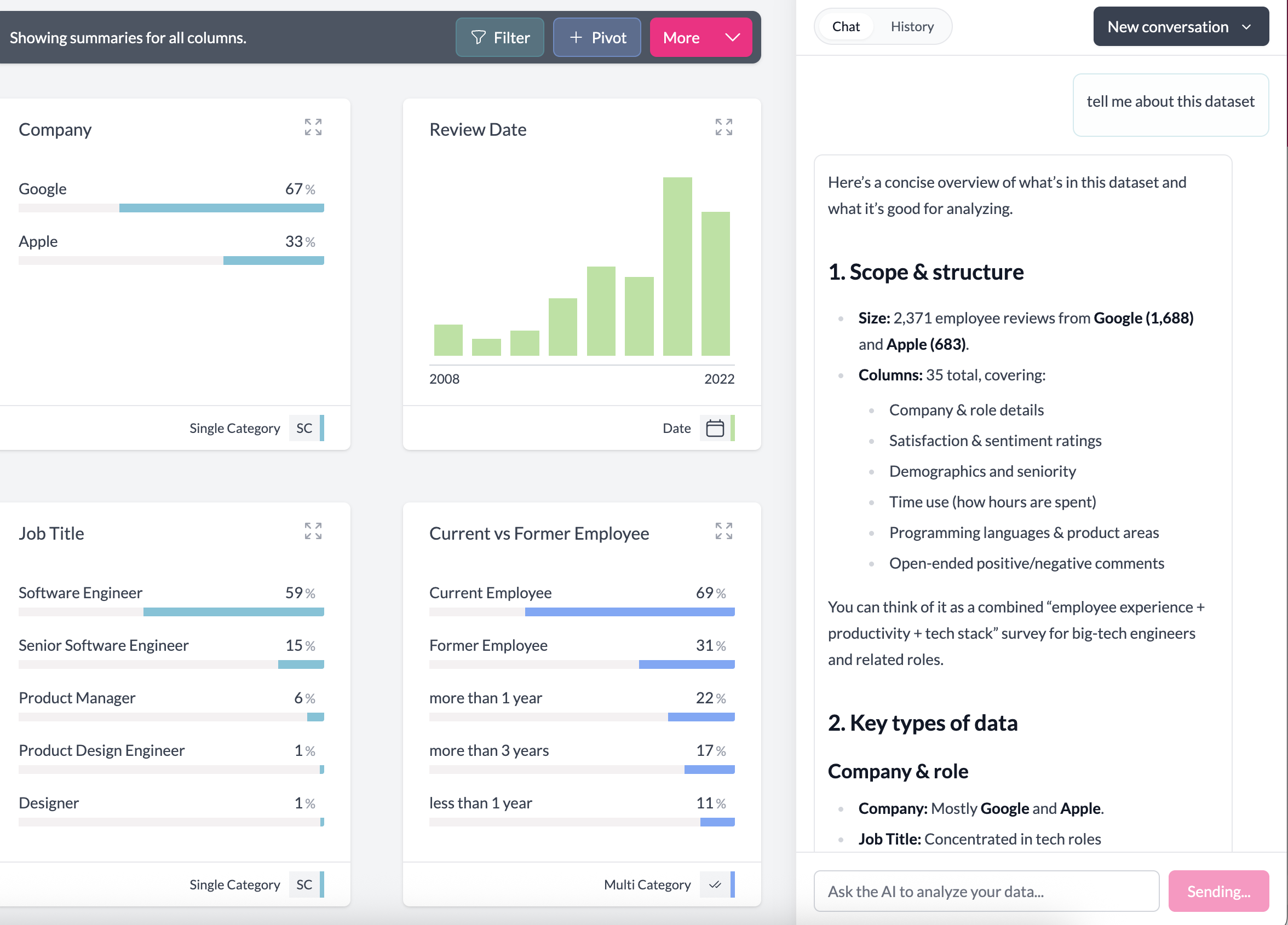
Its AI is tied directly to the statistical engine, charts, filters, and underlying analysis, helping researchers:
- Summarize meaningful differences
- Explain patterns
- Surface key relationships
- Interpret findings faster
- Connect qualitative and quantitative evidence
Importantly, the outputs remain grounded in the actual data.
That matters because researchers need defensible insights, not generic AI summaries.
The goal is not to replace analysts.
The goal is to reduce the manual work between:
"Here is the data"
and:
"Here is what matters."
Open-Ended Responses Are Too Important to Live in a Separate Workflow {toc="Open-Ended Responses"}
One of the biggest weaknesses in older survey workflows is how disconnected open-ended analysis often becomes.
Usually, quant and qual end up living in different tools:
- Tables in one place
- Coding in spreadsheets
- AI summaries somewhere else
- Verbatims copied manually into slides
That fragmentation slows everything down.
AddMaple brings open-ended feedback directly into the main analysis workflow.
Researchers can:
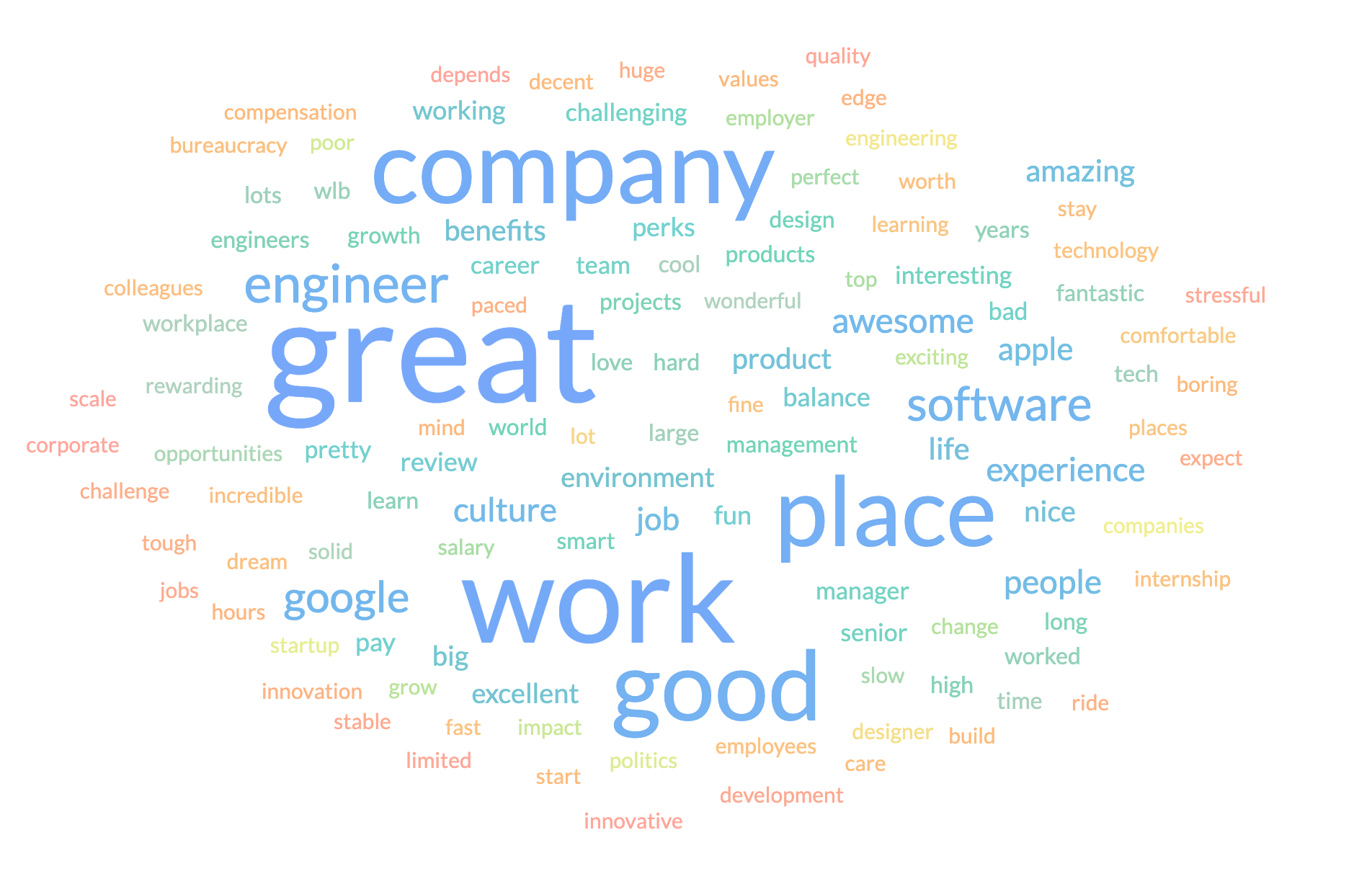
- Identify themes and sub-themes
- Analyze sentiment
- Connect verbatims to segments
- Compare themes across demographics or behaviors
- Use text feedback to explain quantitative patterns
This is increasingly critical because many of the most valuable insights now live in text:
- Customer frustrations
- Employee concerns
- Unmet needs
- Emotional reactions
- Language patterns
- Brand perceptions
Modern insight work requires quant and qual to work together.
AddMaple was designed around that reality.
The Real Cost of Legacy Workflows {toc="Cost of Legacy Workflows"}
Most teams underestimate how much time disappears into:
- Rebuilding charts
- Formatting slides
- Exporting tables
- Handling stakeholder follow-ups
- Recutting banners
- Manually finding significant differences
- Translating tables into stories
That operational drag adds up.
And ironically, it often means researchers spend less time actually thinking deeply about the findings.
The value of modern research tools is not just speed.
It is freeing researchers to focus on interpretation rather than production work.
That is where AddMaple creates leverage.
When WinCross Still Makes Sense {toc="When WinCross Fits"}
To be fair, WinCross may still be a perfectly reasonable fit if:
- Your workflow is heavily table-centric
- Your deliverables are mainly static crosstabs
- Your team is deeply trained on traditional banner workflows
- Your stakeholders mainly consume Excel outputs
- You do not do much qualitative analysis
- Exploration and interactivity are not priorities
There is nothing wrong with needing robust tabulation.
But for many modern insights teams, that is no longer enough.
Why More Teams Are Moving to AddMaple {toc="Why Teams Move"}
Teams move from WinCross to AddMaple because they want:
- Faster insight generation
- Fewer manual reporting steps
- Integrated quant and qual workflows
- Interactive stakeholder deliverables
- AI-assisted analysis grounded in real statistics
- Easier exploration
- Less dependence on static tables
- More time spent understanding data instead of formatting outputs
The shift is not really about replacing crosstabs.
It is about moving beyond a workflow where crosstabs are the center of everything.
The Future of Survey Analysis Is Explorable {toc="Future of Survey Analysis"}
The research industry is moving toward:
- Connected analysis
- Interactive insight delivery
- AI-assisted interpretation
- Integrated qualitative and quantitative workflows
- Explorable reporting
- Faster iteration cycles
Static tables still matter.
But they are no longer the final destination.
WinCross helped define an era of survey analysis built around crosstab production.
AddMaple is built for what comes next:
- Connected understanding
- Faster interpretation
- Stakeholder exploration
- Insight workflows that actually match how modern teams work
If your research process still revolves around generating static tables and manually turning them into stories afterward, it may be time to rethink the workflow itself.
Because the future of insight work is not just better tables.
It is insight that stays explorable.
Questions and Answers {toc="Q&A"}
Is AddMaple a replacement for WinCross?
For many teams, yes. If you mainly use WinCross to produce survey crosstabs, banners, significance testing, and Excel table outputs, AddMaple can cover that kind of work while also giving you a more modern way to explore the data first.
The bigger difference is workflow. WinCross is built around producing tables. AddMaple lets you investigate the data interactively, see which differences matter, connect open-ended responses, and then produce traditional outputs when you need them.
Can AddMaple create traditional data tables?
Yes. AddMaple supports traditional multi-tab Excel data tables, including significance shading and branded formatting.
The difference is that you do not have to start with the table pack. You can explore the dataset first, guided by AddMaple's statistical engine, and then create the table output once you understand what is worth reporting. That means tables become an output from the insight process, rather than the place where the whole analysis has to begin.
Why would I move away from WinCross if it already works?
If WinCross is doing exactly what you need and your workflow is smooth, there may not be an urgent reason to change.
But many teams have outgrown a table-first process. The pain usually shows up after the tables are created: researchers still have to scan huge outputs, find the story, move results into charts, code open ends elsewhere, build slides, and answer stakeholder follow-up questions manually.
AddMaple is useful when you want to reduce that friction and move faster from data to interpretation.
Is this just about AI?
No. The point is not to replace research judgment with AI-generated summaries.
AddMaple is statistically grounded first. Its AI works alongside the statistical and chart engines, so explanations are tied to the data, calculations, charts, and evidence. That makes it more useful for research teams than a generic AI tool that simply writes a plausible-sounding summary.
WinCross has AI too. What's different?
WinCross's Analytical Intelligence helps automate table creation based on the structure of the dataset and your table settings. That is useful if your goal is to produce crosstabs faster.
AddMaple's AI is aimed at a broader part of the workflow. It helps explain patterns, compare groups, summarize findings, work with open-ended responses, and move from observation to interpretation. So the difference is not "AI versus no AI." It is table automation versus insight acceleration.
Does AddMaple handle open-ended survey responses?
Yes. This is one of the big reasons teams look beyond traditional tabulation tools.
AddMaple can turn open-ended responses into themes, sub-themes, sentiment, and verbatim-linked evidence. That means you can connect what people selected in the survey with what they actually said in their own words. Instead of treating open ends as a separate manual coding task, you can bring them into the same analytical workspace.
Can I still export to PowerPoint?
Yes. AddMaple supports editable PowerPoint exports, branded charts, and tables.
That matters because PowerPoint is still the required deliverable for many teams. AddMaple does not pretend decks are going away. It just helps you get to a better deck faster, with the option to share interactive Insight Hubs as well.
What is an Insight Hub?
An Insight Hub is an interactive way to share results, rather than sending only a static deck or spreadsheet.
It lets stakeholders explore the story behind the data, filter views, look at charts, and understand the evidence behind the findings. For researchers, that means the work can keep being useful after the presentation is over.
Will AddMaple work for research agencies?
Yes, especially agencies that need to move quickly from raw survey data to client-ready outputs.
Agencies often need a mix of rigor, speed, branded deliverables, and flexibility. AddMaple helps with that because researchers can explore the data, identify the strongest patterns, work with open ends, create editable outputs, and share polished interactive results without stitching everything together manually.
Will AddMaple work for internal insights teams?
Yes. Internal teams often have a slightly different problem: they need research to travel across the organization.
A static deck may work for one presentation, but different stakeholders usually have different follow-up questions. AddMaple gives teams a way to share results that remain explorable, so people can keep using the research after the initial readout.
Do I need to know statistics to use AddMaple?
You do not need to be a statistician to get value from AddMaple.
The platform is designed to surface meaningful relationships and differences in a way that is easier to explore. The statistical engine helps guide attention toward patterns that matter, while the interface helps users interpret and communicate those findings. Researchers still stay in control, but they do not have to manually test every possible relationship one by one.
Is AddMaple only for survey data?
No. AddMaple can work with surveys, reviews, support conversations, transcripts, internal data, and other feedback sources.
That is an important difference from tools built mainly around tabulation. People do not exist in one dataset, and neither do their signals. AddMaple is designed to help teams connect those signals and understand the bigger picture.
What kinds of projects are best for AddMaple?
AddMaple is especially useful for projects where the story is not obvious upfront, where stakeholders ask lots of follow-up questions, or where open-ended feedback is important.
That includes brand trackers, customer experience studies, employee surveys, segmentation work, product feedback, campaign research, and multi-market studies. It is also a strong fit when the final output needs to be both polished and explorable.
What if my clients still expect Excel tables?
That is fine. AddMaple can still produce Excel data tables.
The change is that you can explore first and export later. So if a client wants a familiar multi-tab Excel output with significance shading and branded formatting, you can provide it. But your team does not have to spend the whole analysis process buried in static tables.
Is AddMaple easier than WinCross?
It depends on what you are trying to do.
If someone is already a WinCross expert and only needs traditional crosstabs, WinCross will feel familiar. But for researchers, strategists, consultants, and stakeholders who want to explore results, understand patterns, and create outputs without relying on a specialist tabulation workflow, AddMaple is designed to feel more accessible.
How should we compare AddMaple and WinCross?
Do not compare them only on whether both can produce tables. Compare the full post-fieldwork workflow.
Ask how long it takes to go from raw data to a useful finding. Ask how many manual steps sit between crosstabs and the final deck. Ask whether open-ended responses are connected to the rest of the analysis. Ask how easy it is to answer a stakeholder's follow-up question. Ask whether the final output is still useful after the meeting.
That is where the difference becomes clear.
What is the simplest way to explain the difference?
WinCross helps you produce crosstabs.
AddMaple helps you explore the data, understand what matters, and turn the findings into outputs people can use.
That does not mean tables are unimportant. It means tables should be part of a better workflow, not the whole workflow.