


Prepare
Import survey & research data
Start when the file arrives — import Qualtrics, Decipher, Alchemer, SPSS, Excel, CSV, live connectors, SharePoint, and governed enterprise data sources without a separate processing step.
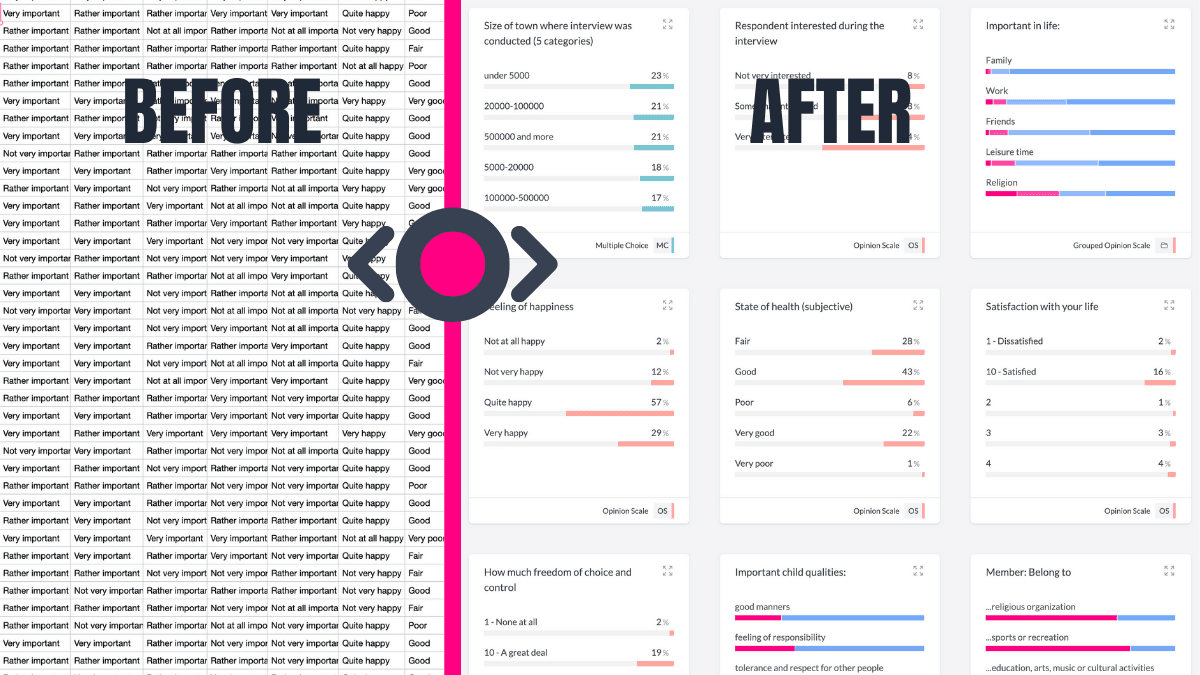
The file arrives. Analysis can start.
Import fieldwork from Qualtrics, Decipher, Alchemer, and QuestionPro — plus SPSS, CSV, Excel, Typeform, SurveyMonkey, Tally, and Google Drive — into an explore-ready workspace. Pick files from SharePoint in your Microsoft 365 tenant, or connect governed enterprise sources such as AWS Athena when manual export cycles are not the right path.
Survey structure survives the import.
AddMaple infers column types, groups related grid questions, detects multi-select structures, and applies schema files when provided. Summaries help the team check distributions and data quality before they build a banner or start asking follow-up questions.
Start with the evidence, not another reformatting cycle.
Every export, reformat, and re-import creates an opportunity for version drift. Here, the imported dataset becomes the same project used for shaping, analysis, and delivery. Next, refine the survey structure or make the changes the study needs without leaving that project.
Enterprise connections when files live in governed systems.
For in-house and enterprise insights teams, AddMaple supports imports from shared file stores and SQL-backed data sources — so tracker files, warehouse tables, and fieldwork exports can become the same governed project analysts use for tables, models, and delivery.
A better starting point for a serious study.
The first import is not the final analysis. It is the point at which the research team can inspect distributions, check how the questionnaire has been interpreted, and decide which questions deserve a banner, a comparison, or a deeper model. Keeping that orientation in the working project means preparation decisions remain connected to the outputs that follow.
Questions teams ask
What data formats can AddMaple import?
AddMaple imports SPSS (.sav), CSV, Excel, and JSON, plus live connectors for Typeform, SurveyMonkey, and Tally. Fieldwork exports from Qualtrics, Decipher, Alchemer, and QuestionPro are supported, along with Google Drive and SharePoint file import for teams on governed Microsoft 365 tenants.
Can AddMaple connect to enterprise data sources?
Yes. Teams can import files from SharePoint, connect AWS Athena and other governed data-lake sources, and use product API keys for Python, R, and automation — so projects start from the systems research already uses.
What happens to survey structure during import?
AddMaple infers column types, groups related grid questions, detects multi-select structures, and can apply schema files when provided.
Do I need to prepare the data in another tool first?
No separate data-processing handoff is required for the supported import paths; the data becomes an explore-ready AddMaple project for inspection and further preparation.
How it works
Step-by-step guides in the AddMaple help center.
- Importing and preparing data
Import Qualtrics, Decipher, Alchemer, SPSS, CSV, Excel, and connected survey platforms — AddMaple detects column types, merges fields, and prepares an explore-ready workspace on import.
Part of AddMaple's feature areas
This capability sits within broader product areas on the features hub.
- Data preparation & live research data
Continue exploring
Follow the next step in the workflow or explore a related capability.
- Survey-native data structuresMultiple-response questions, Likert scales, categorical and ordinal types, grouped variables, nets, and survey metadata — handled as research data, not generic tables.
- Shape and recode without changing the sourceReshape, recode, and derive variables in the same project while keeping the raw source inspectable.
See this capability on a real research workflow.
Bring one study or delivery workflow and we’ll show where AddMaple fits.