


Discover
Advanced research methods
Specialist methods for preference and portfolio decisions, including MaxDiff, TURF and Conjoint — connected to the rest of your study.
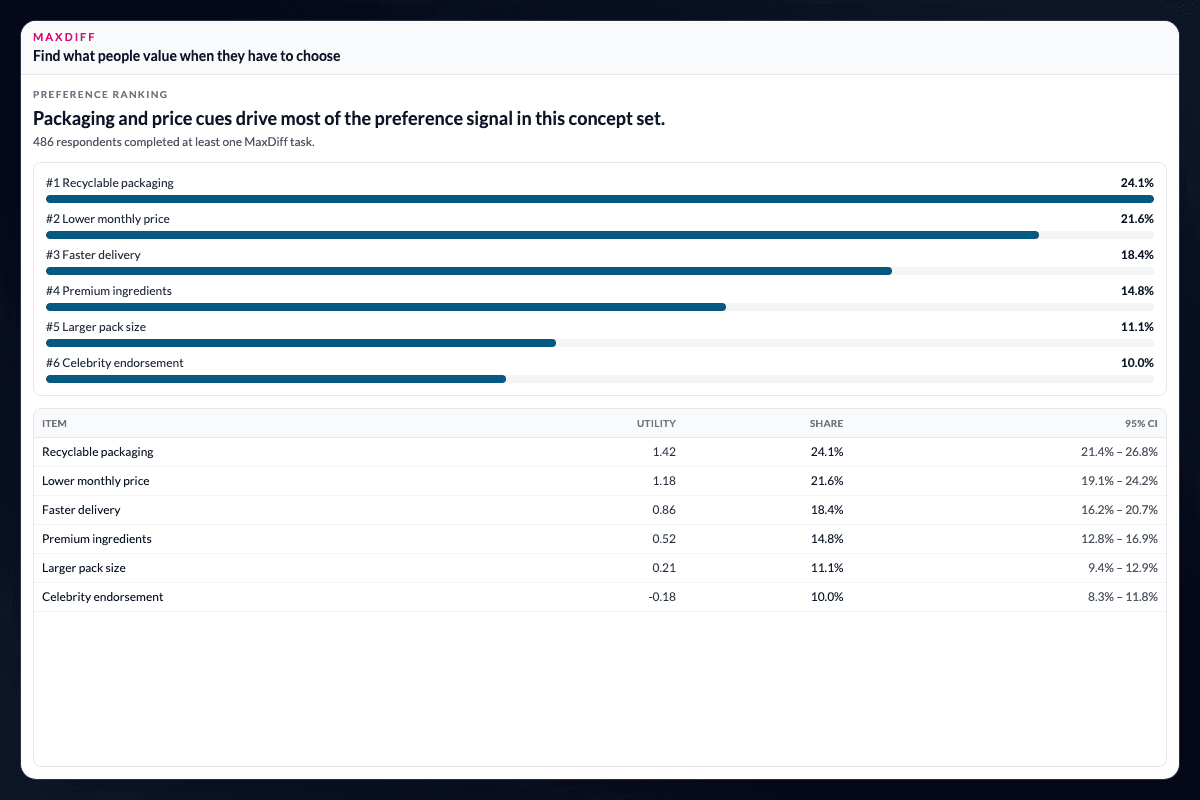
Which items or concepts win preference or reach?
Use specialist methods for preference and portfolio decisions in the same project as the wider study.
- MaxDiff estimates item importance and preference shares from best/worst choice tasks, ranking items by utility with inspectable task-level inputs.
- TURF finds item combinations that maximise unduplicated reach and frequency from multi-select or binary reach columns.
- Conjoint models attribute trade-offs from choice tasks and evaluates preference across defined combinations.
Run choice modelling where the rest of the evidence lives.
Open More → Choice Modeling and select MaxDiff, TURF, or Conjoint. Each method runs on the live project dataset rather than a separate specialist file.
Keep preference evidence connected to the study.
Results feed the same charting, filtering, and Story Dashboard workflow as standard survey analysis. Follow-up cuts by segment, wave, or region can reuse the filters and weights already used elsewhere in the project.
Keep the specialist method connected to the decision.
The value of integrating these methods is not simply having another analysis option. It is being able to place preference, reach, or trade-off results beside the survey measures, segments, and stakeholder story that give them meaning. Researchers can move from the task-level result to the question the study was commissioned to answer without reconciling a second project.
Questions teams ask
Which advanced research methods are available in AddMaple?
AddMaple supports MaxDiff, TURF, and Conjoint analysis for preference, reach, portfolio, and attribute trade-off questions.
Can these methods use the same project data as the rest of the study?
Yes. Each method runs on the live project dataset and its results can continue into AddMaple charting, filtering, and Story Dashboards.
Where do I find MaxDiff, TURF, and Conjoint?
Open More → Choice Modeling in AddMaple and select the method that matches the research design.
Read the evidence in context
Results depend on the study design, data quality, bases, weighting, and method settings. AddMaple calculates the statistical outputs; researchers review practical importance and interpretation. An association is not evidence of causation.
How it works
Step-by-step guides in the AddMaple help center.
- Conjoint analysis
Map choice tasks and concept level columns in Choice Modeling to estimate part-worths, attribute importance, and scenario shares.
- TURF analysis
Find item combinations that maximize unduplicated reach from a multi-select or binary column source in Choice Modeling.
- MaxDiff analysis
Map best/worst task columns in Choice Modeling to rank items by preference share and utility.
Part of AddMaple's feature areas
This capability sits within broader product areas on the features hub.
- Segmentation & advanced analysis
Continue exploring
Follow the next step in the workflow or explore a related capability.
- PCA & dimension reductionWhat underlying dimensions sit behind this battery? Explore latent structure with PCA, loadings, variance explained, and optional Varimax rotation.
- Mental Availability & CEP analysisUnderstand which brands come to mind across buying situations, compare mental availability and Category Entry Point associations, and identify CEP strengths, weaknesses, and whitespace opportunities.
See this capability on a real research workflow.
Bring one study or delivery workflow and we’ll show where AddMaple fits.