


Deliver
Controlled sharing
Share explorable evidence with controlled access — password-protected Hubs and governed read-only views for stakeholders.
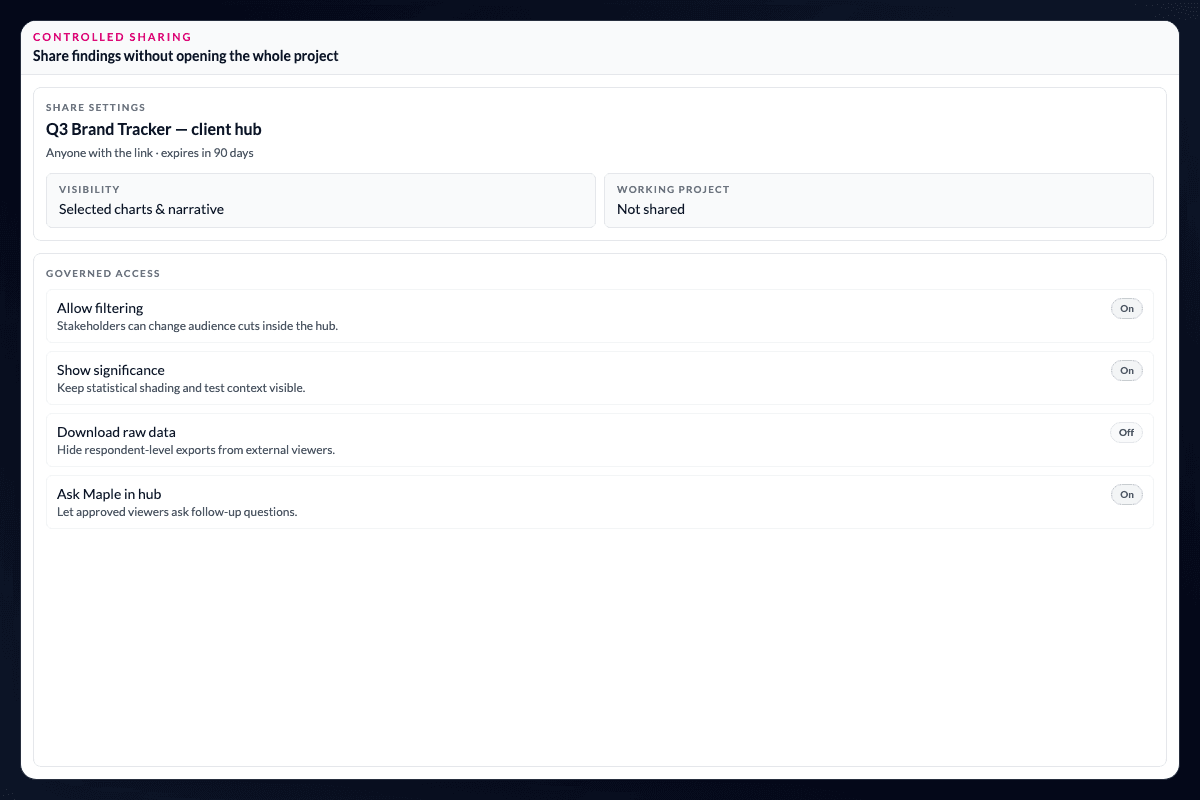
Stakeholders need to explore without entering the analyst workspace.
Share explorable evidence with controlled access through password-protected Insight Hubs and governed read-only views. Readers explore approved data rather than the full working project.
Choose what is available to explore.
Publish Story Dashboards with password protection, select which columns are explorable, and control whether stakeholders can filter and slice independently.
Keep the source project separate from what clients see.
Analyst projects remain separate from client-facing Hubs, so exploration is governed without exposing source files or unrestricted editing. That gives agencies and in-house teams a way to share useful evidence across departments while retaining research control.
Make self-service a governed part of delivery.
The right boundary is not “interactive” or “static.” It is the difference between what the analyst needs while doing the work and what a stakeholder needs after the finding has been approved. A controlled Hub can give readers useful ways to filter and inspect the evidence while keeping source files, working transformations, and unrestricted editing with the research team.
Questions teams ask
Can stakeholders access the analyst’s full AddMaple project?
No. Controlled sharing gives readers access to approved, read-only Hub views rather than the full analyst workspace.
Can I choose which data is explorable?
Yes. You can select which columns are available for exploration and control whether stakeholders can filter and slice independently.
How can I protect a shared Insight Hub?
Insight Hubs can be published with password protection so teams can share approved evidence without making the working project public.
How it works
Step-by-step guides in the AddMaple help center.
- Share with clients
Publish Insight Hubs with password protection and share links so stakeholders can explore approved evidence on their own.
Part of AddMaple's feature areas
This capability sits within broader product areas on the features hub.
- Story Dashboards & Insight Hubs
Continue exploring
Follow the next step in the workflow or explore a related capability.
- Story Dashboards & Insight HubsBuild page-based Story Dashboards in the product, then publish controlled, explorable Insight Hubs that clients and stakeholders keep using after the debrief.
- Embed & share outputsShare chart links in Slack and email, or embed approved outputs in tools such as Notion and websites — distribute findings where teams already work without rebuilding slides.
See this capability on a real research workflow.
Bring one study or delivery workflow and we’ll show where AddMaple fits.