


Discover
Slack team analysis
Analyze team projects in Slack channels, threads, and DMs with the same toolkit as Ask Maple — summaries, crosstabs, drivers, segmentation, and open-text review where your team already works.
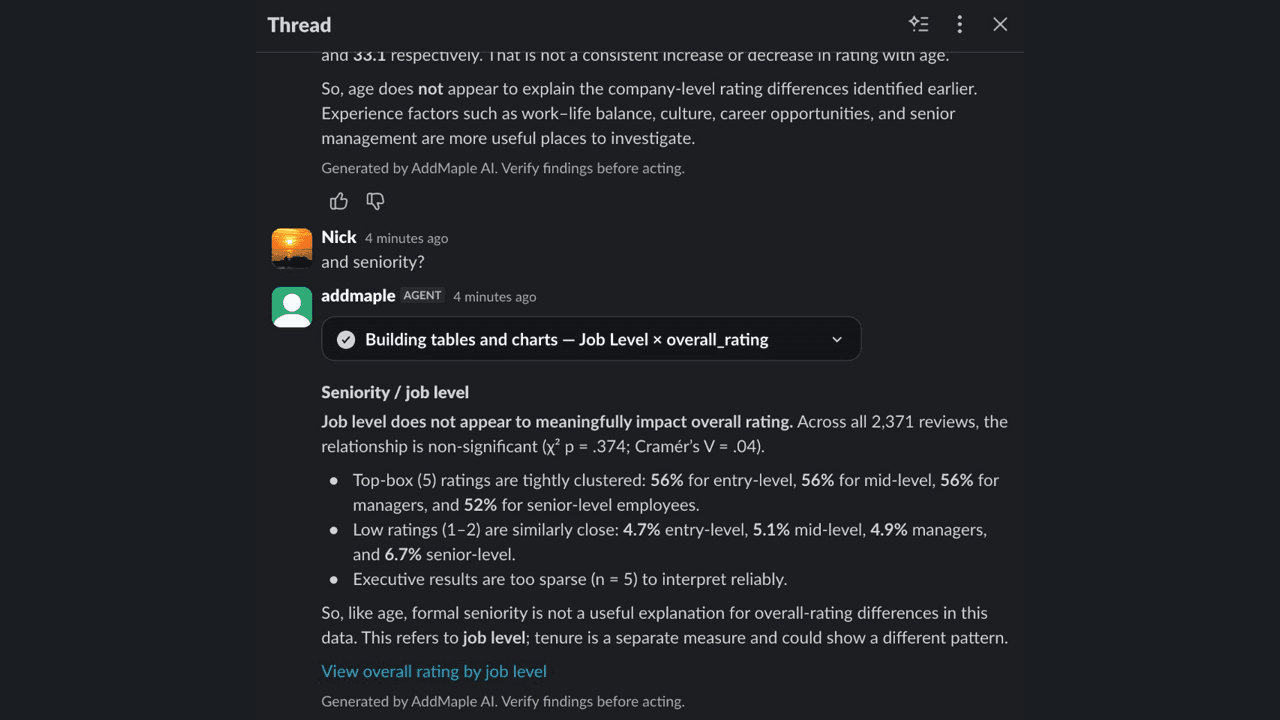
Answer the follow-up in the conversation where it arrived.
The AddMaple Slack app lets teams analyse research projects in the channels, threads, and direct messages where they already collaborate.
Keep the analysis grounded in the live project.
After workspace setup and account linking, each user can bind a thread to a project, ask questions in plain English, and use the same methods as Ask Maple: summaries, crosstabs, drivers, segmentation, clustering, and open-text review. Answers cite figures from AddMaple results rather than guesses.
Use Slack for the discussion; use AddMaple for the working output.
This is different from pasting chart share links into Slack: a share link previews one approved chart, while the Slack app runs project analysis in the conversation. Use the browser when the work needs editable charts, filters, or delivery outputs. Microsoft Teams integration is on the roadmap; contact us if your team wants early access.
Bring analysis closer to the decision without moving the project.
Slack is where a stakeholder may ask, “Does this hold for another market?” or “What is behind this change?” The app lets the team begin that investigation in the thread, while the underlying project remains the place where the analysis, permissions, and reusable outputs are maintained. The conversation can start in Slack without turning every follow-up into a copied spreadsheet.
Questions teams ask
What can the AddMaple Slack app analyse?
The Slack app can use AddMaple project methods for summaries, crosstabs, drivers, segmentation, clustering, and open-text review.
Where can I use AddMaple analysis in Slack?
After setup and account linking, users can bind a project to a Slack channel, thread, or direct message and ask questions in plain English.
Is Slack analysis the same as sharing a chart link?
No. A chart link previews one approved output, while the Slack app runs project analysis in the conversation using the signed-in user’s access.
How it works
Step-by-step guides in the AddMaple help center.
- Set up AddMaple for Slack
Install the AddMaple Slack app, link each user's account, and prepare channels or DMs for project analysis.
- Analyze a project in Slack
Choose a project in a thread, ask questions in plain English, and get analysis grounded in AddMaple results with optional chart links.
Related links
Continue exploring
Follow the next step in the workflow or explore a related capability.
- Ask Maple — AI analysis agentAsk Maple operates AddMaple's analysis capabilities in project context — tables, relationships, key drivers, regression, segmentation, qual coding, and explainable statistical evidence — not a generic chat about data.
- MCP agent accessThe AddMaple analysis engine can be operated from the AI environment your team already uses — Cursor, Claude, ChatGPT, and other MCP hosts — with the same project permissions as the browser.
- Embed & share outputsShare chart links in Slack and email, or embed approved outputs in tools such as Notion and websites — distribute findings where teams already work without rebuilding slides.
See this capability on a real research workflow.
Bring one study or delivery workflow and we’ll show where AddMaple fits.