


Discover
Ask Maple — AI analysis agent
Ask Maple operates AddMaple's analysis capabilities in project context — tables, relationships, key drivers, regression, segmentation, qual coding, and explainable statistical evidence — not a generic chat about data.
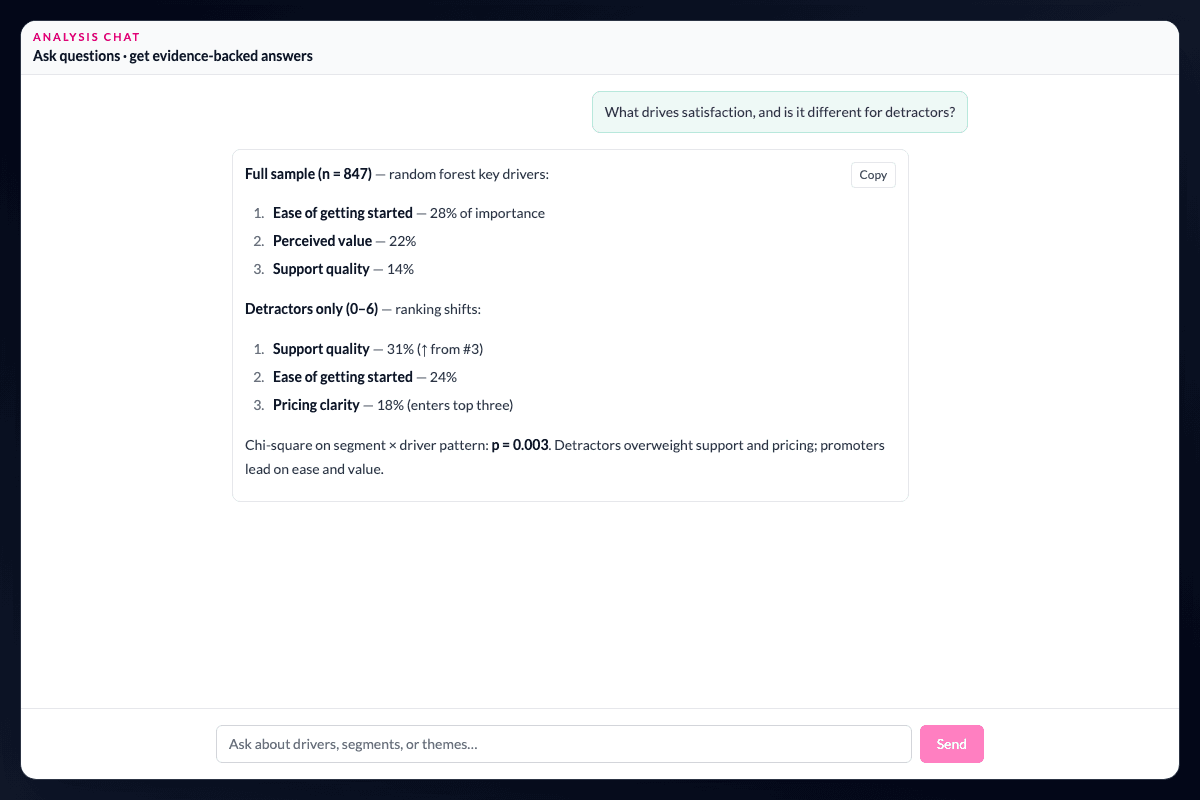
AI operates the analysis. It does not invent the analysis.
Ask Maple operates AddMaple's analysis capabilities—not a generic assistant that answers from language patterns alone. Maple works inside the project and can:
- Inspect the dataset — variables, distributions, and response patterns in context
- Build tables — pivots, crosstabs, and banners you can open, edit, and keep exploring
- Investigate relationships — ranked associations across quant, qual, and mixed survey structures via related columns
- Run key driver analysis — predictive importance and directional evidence with inspectable driver rankings on mixed-type data
- Run regression — explicit linear and logistic models when the researcher wants estimated relationships
- Segment and cluster — K-Means, K-Medoids, HDBSCAN, Balanced HDBSCAN, and researcher-defined segments
- Analyse qual — code open ends, connect themes to quant variables, and explain coded evidence
- Explain — plain-language interpretation backed by named statistical tests and inspectable outputs
Receive an output you can inspect and continue working with.
Analytical answers return editable charts, tables, and views that researchers can validate and keep exploring. Ask Maple sits on top of the statistics engine, pivot outputs, and inspectable evidence, so acceleration does not trade away defensibility.
Continue the conversation after the debrief.
On published Insight Hubs with explorable data enabled, stakeholders can ask follow-up questions through the Analysis Agent, grounded in the approved dataset. A researcher can investigate a dataset, run drivers, or explore segmentation; an in-house team can answer the next question without restarting the analysis from scratch.
Keep AI assistance inside a researcher's judgement.
Ask Maple can shorten the path from a question to an analytical output, but it does not decide what a finding means for the business. Researchers can open the chart or table, inspect the method and evidence, change the cut, and continue the analysis themselves. That is the difference between an answer that sounds plausible and a result the team can work with.
Questions teams ask
What can Ask Maple do with a research project?
Ask Maple can inspect data, build tables, investigate relationships, run key-driver analysis and regression, segment and cluster, code qualitative data, and explain results with statistical context.
Is Ask Maple a generic chatbot?
No. Ask Maple operates AddMaple’s analysis capabilities inside the project and returns charts, tables, and views grounded in the statistics engine and project evidence.
Can stakeholders ask questions in an Insight Hub?
Yes, when the published Hub has explorable data enabled. Follow-up questions are grounded in the approved dataset rather than the analyst’s full working project.
How it works
Step-by-step guides in the AddMaple help center.
- Ask Maple — analyze your project with AI
Use the Analysis Agent to explore tables, relationships, key drivers, segmentation, and text — grounded in your project and AddMaple's statistics engine.
- Ask AI questions in a published Insight Hub
Let stakeholders ask plain-English questions about explorable data inside a published Story Dashboard.
Part of AddMaple's feature areas
This capability sits within broader product areas on the features hub.
- Ask Maple — AI analysis agent
Continue exploring
Follow the next step in the workflow or explore a related capability.
- Instant summaries across every variableUpload research data and immediately see every variable — distributions, categories, and response patterns — without building a dashboard first.
- Turn qualitative themes into quantitative evidenceCode open ends and transcripts into themes, inspect verbatims, convert themes to variables, and cross-tab and test them against quant — in one loop.
- MCP agent accessThe AddMaple analysis engine can be operated from the AI environment your team already uses — Cursor, Claude, ChatGPT, and other MCP hosts — with the same project permissions as the browser.
- Slack team analysisAnalyze team projects in Slack channels, threads, and DMs with the same toolkit as Ask Maple — summaries, crosstabs, drivers, segmentation, and open-text review where your team already works.
See this capability on a real research workflow.
Bring one study or delivery workflow and we’ll show where AddMaple fits.