


Audience groups · Mosaic in depth
Audience groupsFind the groups of people hiding in the answers — and who you are really talking to.
Surveys arrive sorted by demographics — age, region, gender — because those were the easy questions to ask. But the people who would buy your product are rarely “35–44, South East”. Audience groups (also called segmentation or clustering) is the part of AddMaple that groups respondents by how they answered, so you can see the audiences that actually exist in the sample, compare competing ways of grouping them, and use the one you keep everywhere else in the study.
New to AddMaple?
AddMaple is a workspace for analysing survey data: you import a study, and every question is charted, tabulated and ready to ask questions of. This page explains one part of it from scratch — what it is, when you’d use it, and how to read what it shows you.
Every image is the real product, rendered from one illustrative study — the Sparkling tea concept test, 1,204 respondents, 112 questions. Nothing is mocked up.
Start with the whole study →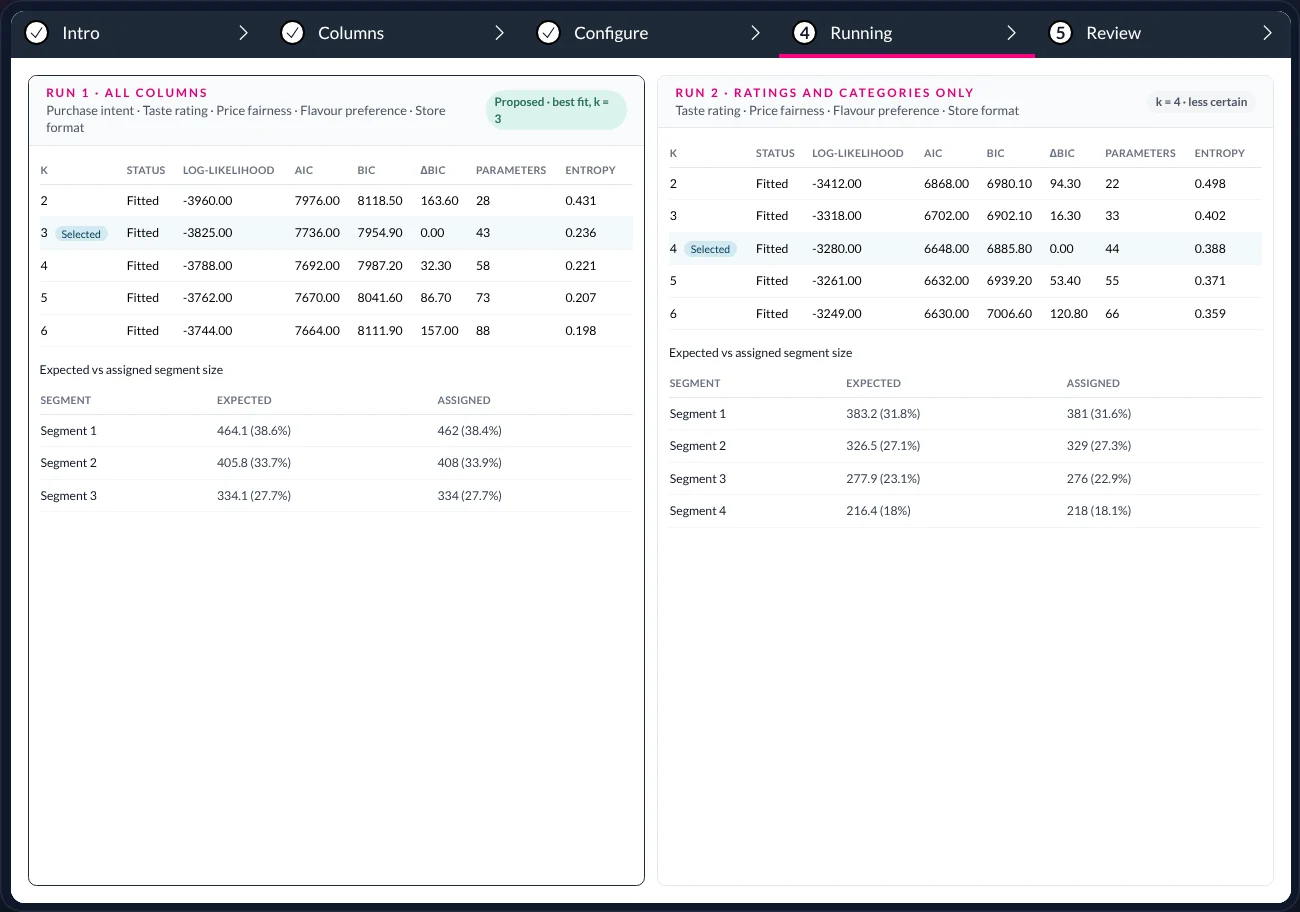
In short — 1 minute
Or read the full walkthrough — about 18 minutes
- What it is. A way of grouping respondents by the pattern of their answers rather than by who they are — producing a handful of “audience groups”, each with the answers that define it.
- What problem it solves. Demographic cuts describe people without explaining them. Purchase intent barely moves between age bands here; it moves a great deal between the groups the answers reveal.
- What you do. Choose the questions that describe how someone thinks. AddMaple picks a method to suit them, tries 2 to 6 groups, and proposes the best fit. Run it again a different way and compare.
- What you get. Named groups with their defining answers and sizes, the diagnostics to judge them by, and — once you keep one — a new column that works as a banner, a filter and a story lens across the whole study. The engine proposes; the researcher decides.
- k = 2…6
- candidate numbers of groups tried per run
- 3
- groups in the proposed best fit
- 2
- runs compared before deciding
- 38.4%
- largest group · Flavour explorers · 462 people
01 · What it is
Let the answers group the people, then decide whether the groups make sense.
A segmentation takes a set of questions and finds respondents who answered them in similar ways. Each cluster of similar people becomes a group. The method does the grouping; the researcher judges whether the groups are real, stable, and useful enough to name.
The problem
A launch team asks “who are we talking to?” and gets back age bands and regions, because that is how the data is organised. Four age bands by four regions is sixteen cells and no story — whatever separates the people who would buy from those who wouldn’t is not on the front page of the questionnaire.
What it does
Fits a statistical model that sorts respondents into groups by their answers to the questions you choose. It tries every number of groups from 2 to 6, reports how well each fits, and proposes the best. Run it again on a different set of questions and both runs sit side by side for comparison.
What you end up with
Groups with people in them — sizes, defining answers, suggested names — plus the diagnostics to defend the choice. Keep a solution and it becomes a column in the study: a banner in every table, a filter on every chart, a lens in the published story.
Use it when…
The brief says ‘everyone’ and you suspect it isn’t; you need target audiences for messaging or product decisions; or demographic cuts show little difference and you want to know what does.Group on…
The questions that describe how someone thinks or behaves — ratings, preferences, where they shop, what they would pay. Demographics are usually better left out of the model and brought back afterwards to describe each group.Remember that…
The engine proposes the best-fitting candidate on the numbers. Whether three groups or four is the right answer for the business is a judgement — yours — and the product is built to help you make it, not make it for you.
02 · The example
1,204 sparkling tea respondents. Who should the launch talk to?
The illustrative study throughout this series: a concept test for a sparkling tea, 1,204 respondents, 112 questions. The launch team wants to know who to aim the message at. The obvious cuts are already there — and they are quiet.
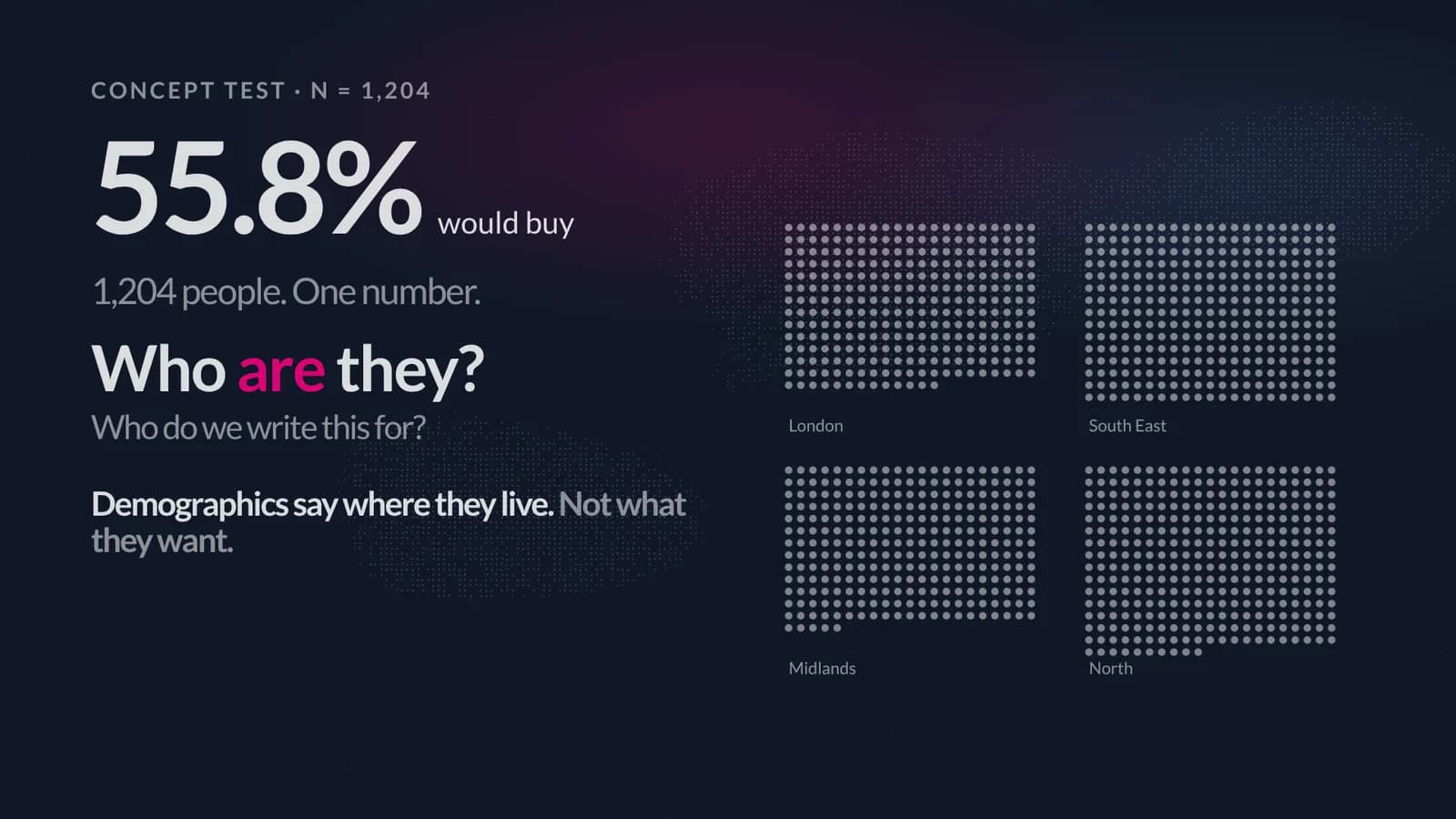
Purchase intent barely moves between age bands or regions. So the question Audience groups asks of the same 1,204 people is different: if we group them by how they rated taste and price, which flavour they chose, where they shop and whether they would buy — what groups appear?
03 · Step by step
Columns, Configure, Run, Review — and run it again.
Segmentation runs as a short guided flow — Intro, Columns, Configure, Running, Review — opened from the study. Here is each screen, what is on it, and what you are being asked to decide.
- 01
Choose the columns that describe a person
What you are deciding: which questions the grouping should be based on. Here: taste rating, price fairness, flavour preference, store format and purchase intent — five questions about how someone relates to the product. Mixed types (rating scales and multiple-choice together) are fine.
Age and region are left out of the model. They come back at the end, to describe who is in each group.
- 02
Let AddMaple choose the method — and see why
What you are seeing: the Configure step. On the left, the available algorithms, each with a one-line description of what data it suits. Latent class analysis is marked Recommended because the chosen columns are categorical and ordinal — survey answers, not measurements. K-Means is greyed out with the reason: it is for numeric data only.
On the right, Number of classes is set to Auto (2–6): the engine will fit every number of groups from 2 to 6 and select the one with the lowest BIC. You can fix the number instead if the brief demands it.
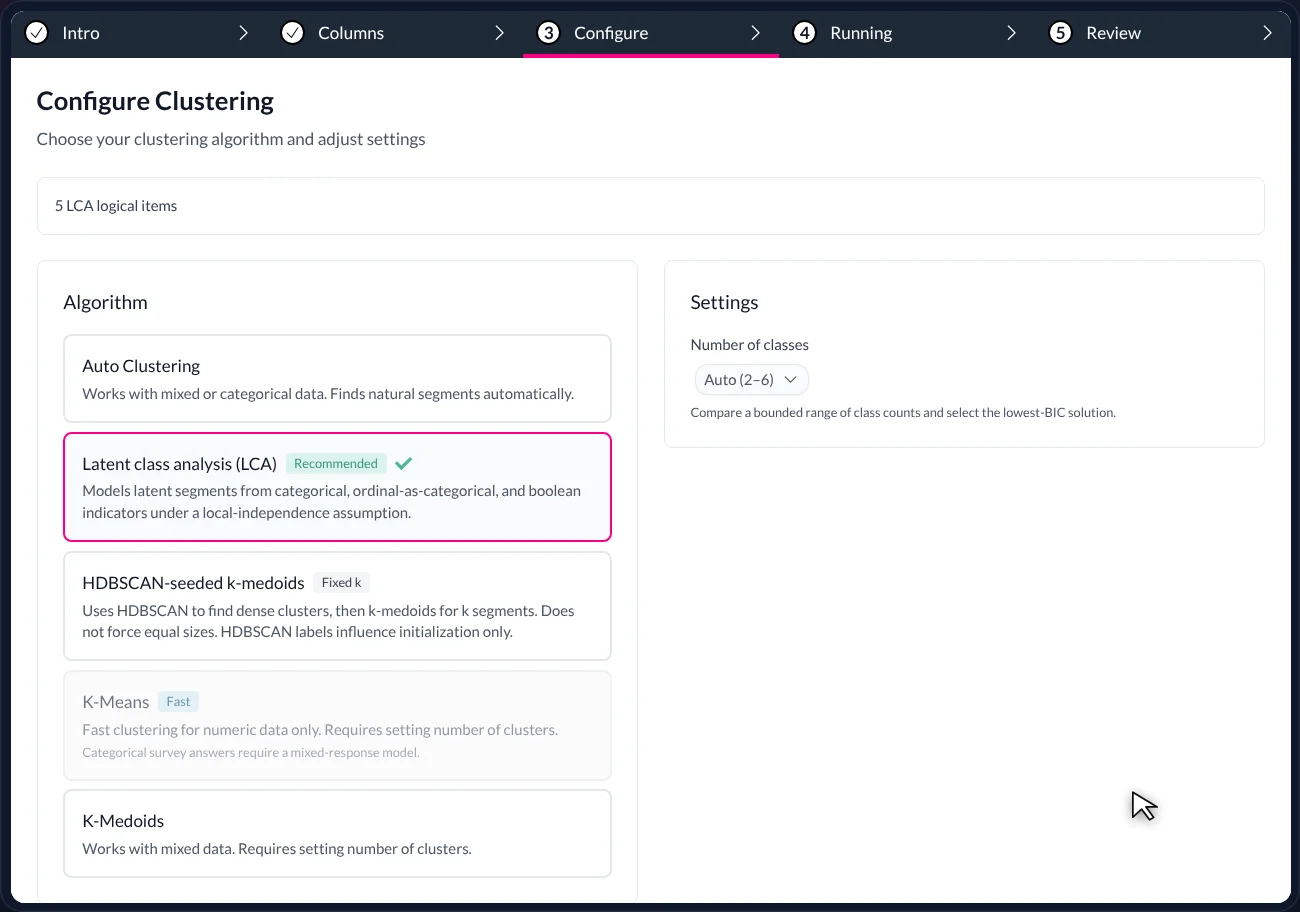
Configure. The recommended method is chosen to suit the column types; the alternatives are listed with the reason each would or wouldn’t fit. Auto (2–6) tries every number of groups. - 03
Read the candidates
What you are seeing: Model comparison and diagnostics. Each row is one candidate solution — 2 groups, 3 groups, up to 6 — with its fit statistics. The one to look at first is BIC: lower is better, and the row with ΔBIC = 0.00 is the best fit. Here that is k = 3. Entropy (lower is better here) says how cleanly people are assigned to their groups.
Below the table, Expected vs assigned segment size compares the size each group should be according to the model with the number of people actually assigned to it. When they agree to within a few people, as here, the solution is stable rather than wishful.
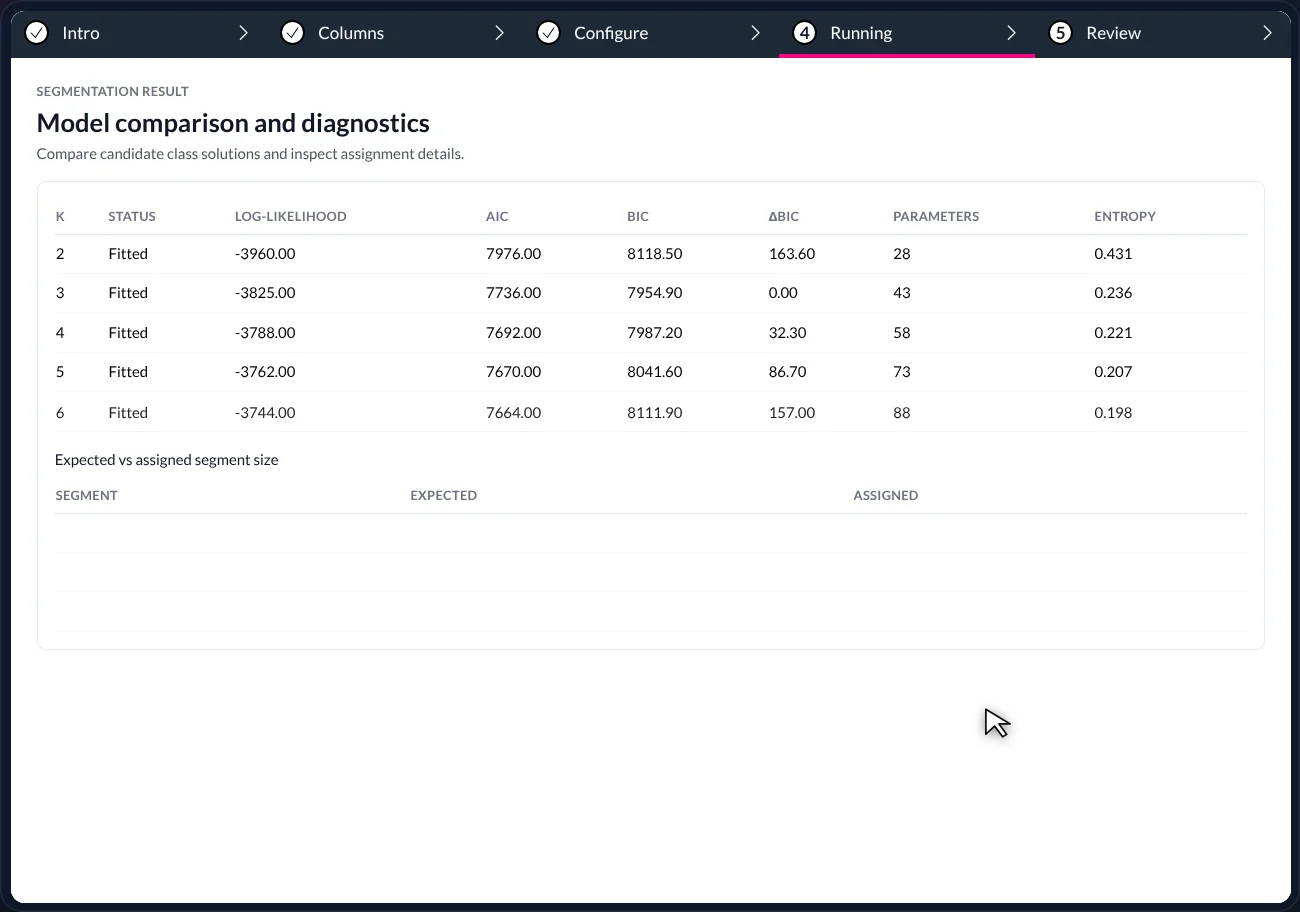
The candidate table. k = 3 has the lowest BIC (ΔBIC 0.00) and the expected and assigned sizes agree — 464 expected, 462 assigned for the first group. - 04
Run it again, a different way, and compare
What you are seeing: two runs side by side. Run 1 used all five columns and is marked Proposed · best fit, k = 3. Run 2 used ratings and categories only — no purchase intent — and its best candidate is k = 4, flagged less certain because its entropy is higher.
This is the decision point. The engine has proposed one. The researcher decides whether four groups with less certainty would be more useful than three with more — and can keep either, or both, for the record.
Two runs. The engine marks the proposed best fit; the comparison is laid out so the researcher can disagree with it on evidence.
04 · How to read the result
The candidate table, column by column.
The diagnostics table is the part newcomers find most forbidding, so here is what each column means and which ones to look at first.
Both runs share the same columns. Read BIC and ΔBIC first, then entropy, then the sizes.
- Run header
- Which columns went into the run, and the engine’s verdict: ‘Proposed · best fit, k = 3’ or ‘k = 4 · less certain’. Two runs with different inputs are a fair comparison; the header tells you what differed.
- K
- The number of groups in that candidate solution. Auto (2–6) fits all five rows; the ‘Selected’ tag marks the one the engine proposes.
- Log-likelihood, AIC, BIC
- Three measures of how well the solution fits the data, each penalising complexity differently. BIC is the one the engine uses to choose; lower is better. More groups always fit the raw data better, so BIC’s penalty for extra parameters is what stops it picking k = 6 every time.
- ΔBIC
- The gap between this row’s BIC and the best one. 0.00 marks the best fit. A gap under about 10 means two candidates are close enough that judgement, not the statistic, should decide.
- Parameters
- How many numbers the model had to estimate. Rises with k; a useful sanity check that a ‘better’ fit is not just a more complicated one.
- Entropy
- How cleanly respondents are assigned to groups — lower means people fall clearly into one group rather than sitting between two. Run 2’s higher entropy is why it is flagged less certain.
- Expected vs assigned segment size
- For the selected solution: the size each group should be according to the model, next to the number of people actually assigned. Agreement within a handful of people means the solution is stable.
- What is not here
- Names. The groups are Segment 1, 2, 3 until the Review step shows their defining answers. Naming is a researcher’s job, and the product leaves it to you.
05 · What it told us
Three audiences, each with a different job for the launch.
The Review step shows each group with the answers where it differs most from everyone else — the signals that earn it a name.
- 38.4%
- Flavour explorers · 462 people
- 33.9%
- Price-first sceptics · 408 people
- 27.7%
- Habit buyers · 334 people
Chose Yuzu & ginger, rated taste highly. They shape the message.
Rated price fairness ‘Unfair’, intent ‘Unlikely’. They raise a pricing question.
Usual grocery store, Classic lemon. They point at distribution.
Each group comes with its signals attached, so the names are earned, not invented — and you can rename them if yours are better. Now the study has people in it: the flavour explorers shape the message, the sceptics raise a pricing question, the habit buyers point at where the product needs to be on shelf.
06 · Using the groups
Keep a solution and it becomes part of the study.
Press Add segment column and the groups stop being a model output. They become a column — one that every table, chart, filter and story in the project can use.
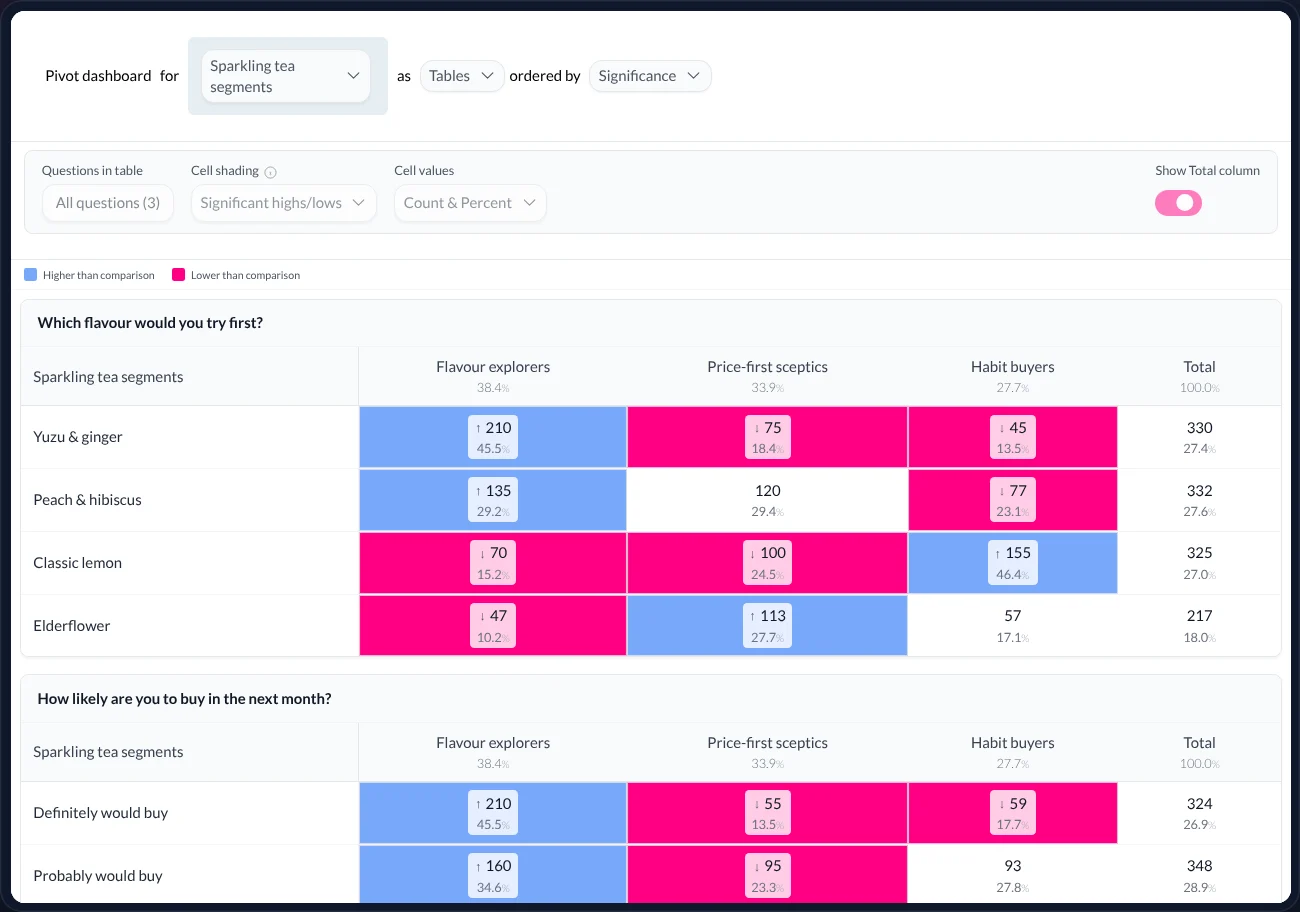
As a banner
Every question in the study, broken down by group, ordered by how differently the groups answered — in Table Studio.As a filter
Filter to Flavour explorers and every chart, every key-drivers model and every answer from Maple uses that base.As a story lens
Readers of the published story can switch group and watch the evidence follow.As a saved object
The run, its diagnostics and the alternative you rejected are kept with the project, so the choice can be revisited.
07 · How we keep it honest
Rules the product follows so you don’t have to remember them.
Method fits the data
Latent class analysis for mixed scales and categories; the alternatives are listed with the reasons they would or wouldn’t suit. Nothing is forced into one number first.Every candidate, every diagnostic
k = 2…6 fitted on every run, with BIC, entropy and expected-vs-assigned sizes visible. The proposed fit is the lowest BIC — and it says so.Groups are earned
Each group is defined by the answers where it differs most. The default labels follow from those signals; rename them, but the signals stay.You decide
The engine proposes. Two runs can be compared. The researcher keeps the solution that is stable, interpretable and useful — and can change their mind later.
08 · Words used on this page
A short glossary.
- Segmentation / clustering
- Grouping respondents by the similarity of their answers. ‘Audience groups’ is what AddMaple calls the result.
- k
- The number of groups in a candidate solution. Auto (2–6) tries k = 2, 3, 4, 5 and 6.
- Latent class analysis (LCA)
- A model that finds hidden (‘latent’) groups behind categorical and ordinal answers — the natural fit for survey data.
- BIC
- Bayesian information criterion: a fit score that rewards explaining the data and penalises complexity. Lower is better; the engine proposes the lowest.
- ΔBIC
- How far a candidate’s BIC is from the best. 0.00 is the best fit; small gaps mean close candidates.
- Entropy
- How cleanly people are assigned to groups. Lower is cleaner. Higher entropy is why a run is flagged ‘less certain’.
- Expected vs assigned
- The group sizes the model implies, against the number of people actually placed in each. Agreement means stability.
- Segment column
- The saved groups as a column in the study — usable as a banner, filter or story lens like any other question.
09 · Questions
What researchers ask us about audience groups.
- Why latent class analysis rather than k-means?
- Because survey data is mostly scales and categories, not continuous measurements. Latent class models fit those directly and give you fit statistics (BIC, entropy) to compare solutions. Other methods remain available where the data suits them, and the Configure step says which.
- How many groups should I keep?
- The engine proposes the lowest-BIC candidate. Look at entropy and at expected versus assigned sizes, run it again with a different column set, and keep the solution that is stable and that the people using it can explain. The product makes the comparison easy; it does not make the choice for you.
- Can I use demographics in the profile without using them in the model?
- Yes — and we recommend it. Group on how people think; then put the segment column against age, region or anything else as a banner to see who is in each group.
- What happens to the run I didn’t keep?
- It stays with the project as a candidate, with its diagnostics, so you or a colleague can reopen the comparison later.
- Do I need to understand BIC and entropy to use this?
- You need to know two things: lower BIC is a better fit, and lower entropy is a cleaner assignment. The engine applies both and labels the result in words — ‘Proposed · best fit’, ‘less certain’. The numbers are there for when you want to check its reasoning.
Keep reading — the same study, other questions
Key drivers
Which answers relate most to the result?
Rank the questions most strongly related to an outcome — across scales, categories and coded open-ends.
Read →Table Studio
Every table, and what they mean
Crosstabs for the whole study, ordered by significance, shaded where it matters, exported as a branded workbook.
Read →Ask Maple
Your research agent
An agent that works inside the analysis — explaining, charting, coding, modelling and drafting the story.
Read →
AddMaple Mosaic
Find the people in your sample.
Bring a study where ‘everyone’ is the audience. We’ll find the groups in it with you — and show how they travel into every table, chart and story.