


Key drivers · Mosaic in depth
Key driversWhich answers are most related to the result you care about?
A survey tells you how many people would buy, recommend, or stay. It does not tell you which of the other hundred questions have most to do with that. Key drivers is the part of AddMaple that answers this: pick the result you care about, and it ranks every other question in the study by how strongly it relates to it — and tells you which way.
New to AddMaple?
AddMaple is a workspace for analysing survey data: you import a study, and every question is charted, tabulated and ready to ask questions of. This page explains one part of it from scratch — what it is, when you’d use it, and how to read what it shows you.
Every image is the real product, rendered from one illustrative study — the Sparkling tea concept test, 1,204 respondents, 112 questions. Nothing is mocked up.
Start with the whole study →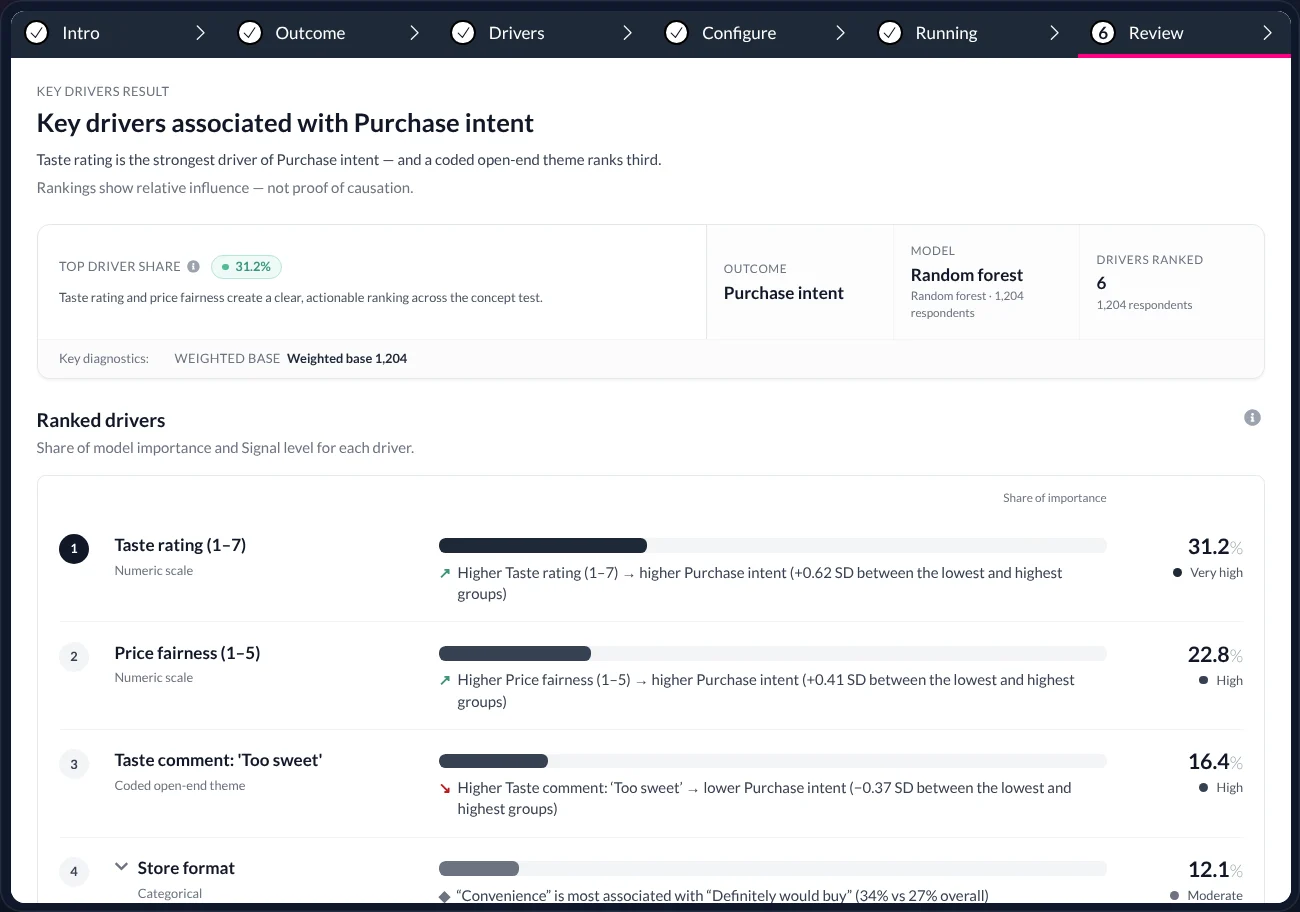
In short — 1 minute
Or read the full walkthrough — about 16 minutes
- What it is. A ranked list of the survey questions most strongly related to one result (the “outcome”) — built from one statistical model, not hundreds of separate tables.
- What problem it solves. “We have the number — now what should we work on?” Without it, that is a week of crosstabs with no way to tell which differences matter most.
- What you do. Choose the outcome, confirm the candidate questions AddMaple proposes, press Run. Open-ended comments can be included once they are coded into themes.
- What you get. Each driver with its share of model importance, the direction of the relationship in plain words, and the method disclosed on the result. Relationships, not causes — priorities to investigate, in order.
- 1
- outcome per model — here, Likely to buy (55.8%)
- 38
- candidate questions screened, every type
- 31.2%
- share of importance · the top driver, Taste rating
- 3
- priorities the result points at
01 · What it is
One model that ranks every question by its relationship with the result.
Imagine a study with a purchase-intent question and a hundred others — ratings, multiple-choice answers, demographics, a free-text comment. Key drivers takes the one you care about and asks, of all the rest: which of these are most related to it, and in which direction?
The problem
The headline number is rarely the question. The client wants to know what to change. Finding that by hand means cross-tabulating the outcome against every other question and eyeballing a hundred tables — with no principled way to say which differences matter most, and no way to include what people wrote.
What it does
Fits one statistical model (a random forest by default) with your outcome as the thing to be explained and the other questions as candidates. It ranks the candidates by how much of the model each accounts for, works out the direction of each relationship, and writes it out in words.
What you end up with
A single ranked list with a percentage, a direction and a size for every driver, plus the method and sample disclosed underneath. It reads as a to-do list for the analysis: what to investigate first, and why.
Use it when…
You have an outcome worth explaining — intent to buy, satisfaction, likelihood to recommend, churn — and more candidate questions than you can test one by one.It works across…
Rating scales, single- and multiple-choice questions, derived variables such as NETs, and open-ended comments once they are coded into themes. They all go into the same ranking.It is not…
A causal claim. A high rank means a strong relationship in this data, which is a reason to investigate — not proof that changing the answer would change the outcome.
02 · The example
A concept test for a sparkling tea. 55.8% would buy. What should the team work on?
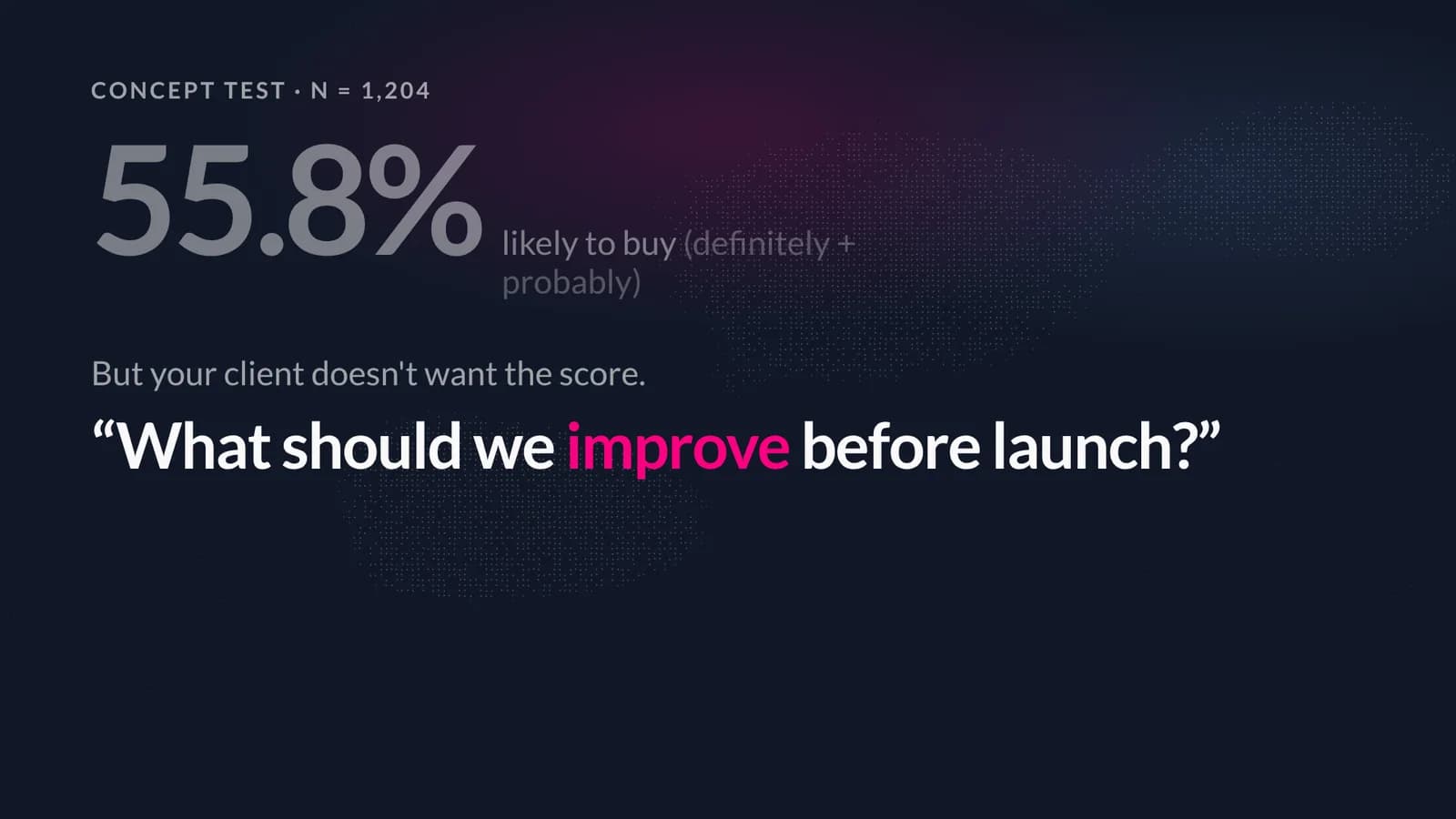
Every page in this series uses the same illustrative study: a concept test for a new sparkling tea — 1,204 respondents, 112 questions. The purchase-intent question says 672 people (55.8%) would definitely or probably buy. The client’s question is “what should we improve before launch?”
The candidates for an answer are spread across the questionnaire: a 1–7 taste rating, a 1–5 price-fairness rating, a flavour choice, where people usually shop, how familiar they are with the brand, their age — and 1,204 free-text taste comments nobody has read in full. This is exactly the situation Key drivers is for.
03 · Step by step
Four screens, in the order you see them.
Key drivers runs as a short guided flow inside AddMaple — Outcome, Drivers, Configure, Run, Review — opened from any question in the study. Here is each step, with what is on screen and what it is asking you to decide.
- 01
Choose the outcome
What you are deciding: the one result the model should explain. Here it is Likely to buy — a yes/no built from the purchase-intent question by grouping “Definitely would buy” with “Probably would buy”.
Any question can be the outcome: a rating, a single choice, or a derived variable like this one. The model explains this and nothing else, so choose the thing the client actually asked about.
- 02
Confirm the candidate drivers
What you are seeing: the Drivers step. AddMaple has screened the study and proposed a set of questions that could plausibly relate to the outcome. Each row is one question, with its column type on the right — Opinion scale, Single category, Multi category. Ticked rows are in; use the search box to add more or untick to remove.
The blue notes explain two things newcomers ask about: a multiple-choice question is tested as one question (not one driver per option), and mixing attitudes with behaviour and demographics usually gives a richer result than one kind alone. Nine questions are selected here out of 38 candidates.
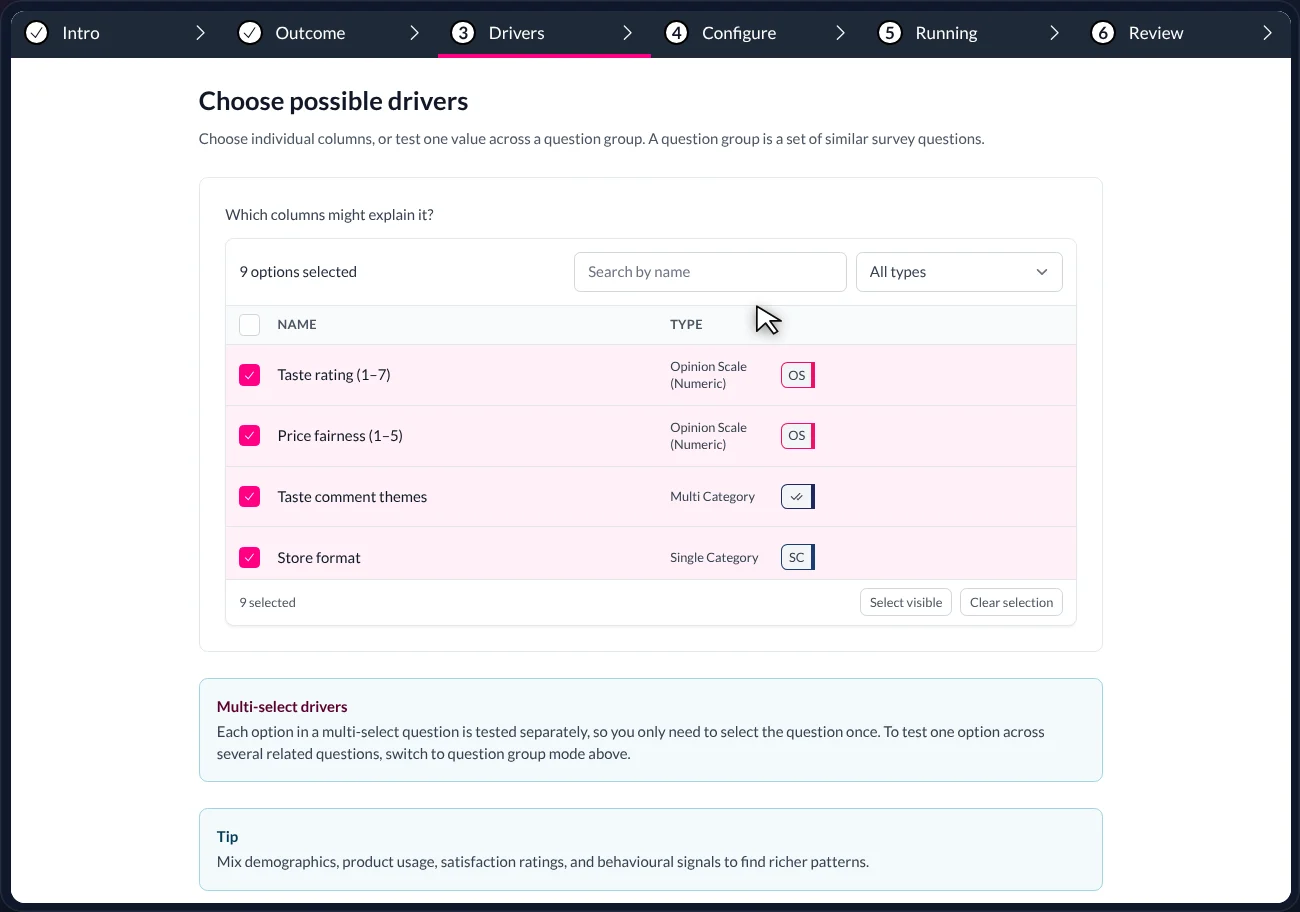
The Drivers step. Ticked rows are candidates; the TYPE column tells you what kind of question each is. Nine selected here, out of 38 the study offered. - 03
Include what people wrote — as a coded column
Why this step exists: a model cannot rank raw sentences. So before running, the open-ended taste comments are coded — each comment is tagged with the themes it expresses (“Too sweet”, “Refreshing”, “Price concern”, “Tastes natural”). Each theme then behaves like any other yes/no answer and can be a candidate driver.
What you are seeing: AddMaple’s table view of the study, showing three columns per respondent: their shopper type, the comment they typed, and the themes applied to it. Inside each theme chip, the words that earned it are highlighted — so you can check the coding by reading. The panel on the right shows how often “Too sweet” appears in each shopper type.
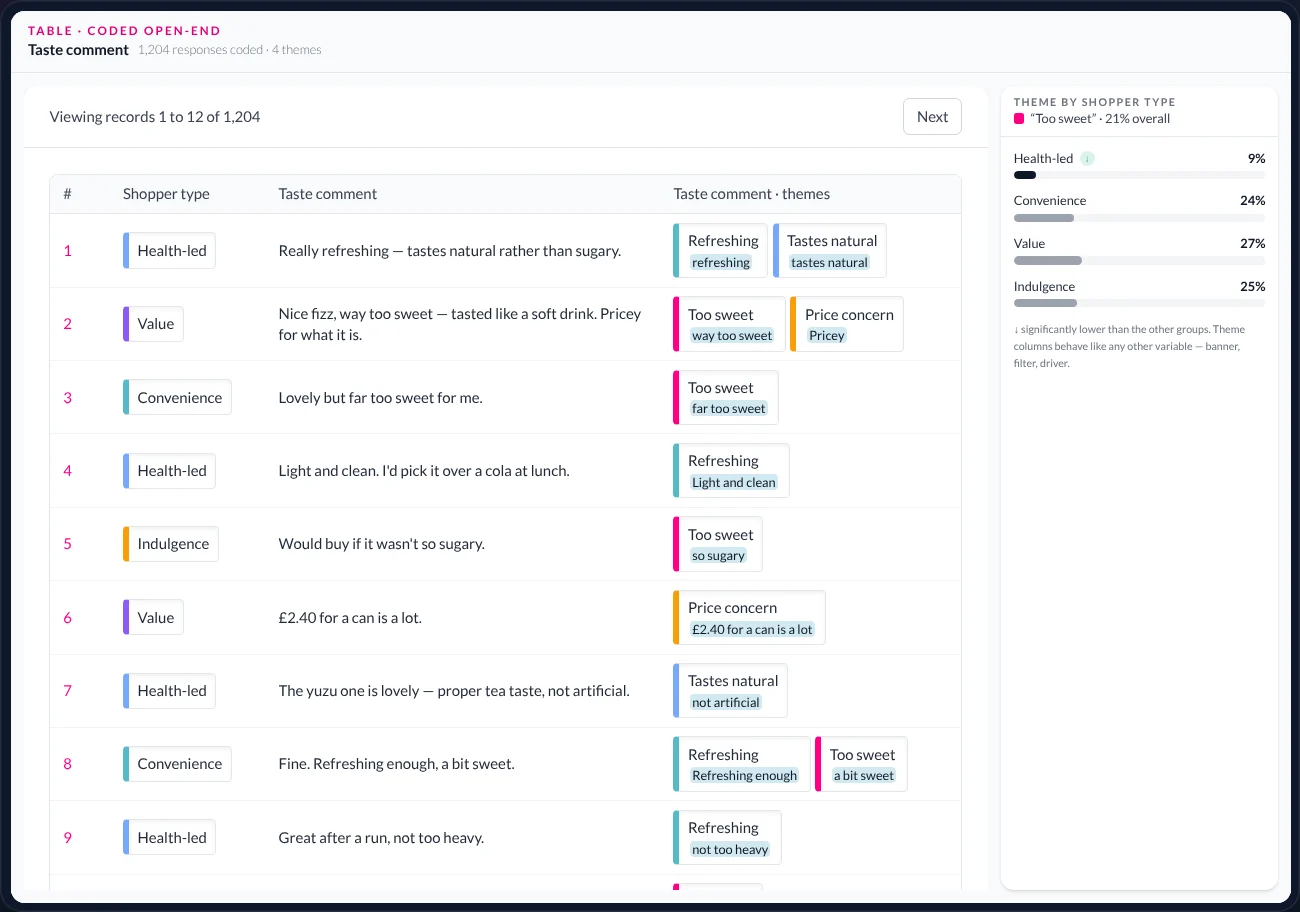
The table view with the coded column. Row 3: “Lovely but far too sweet for me” → Too sweet, with “far too sweet” highlighted as the evidence. Right: health-led shoppers say it far less often (9% vs 24–27%). - 04
Run, and land on the result
What happens: AddMaple fits a random forest — 200 decision trees, each trained on a different slice of the 1,204 respondents — and measures how much each candidate contributes to predicting the outcome. It then works out the direction of each relationship and writes it out.
The result screen is explained part by part in the next section.
04 · How to read the result
Every part of the Key drivers result screen, explained.
This is the screen the flow ends on. It is designed to be read top to bottom by someone who was not in the room — including the client.
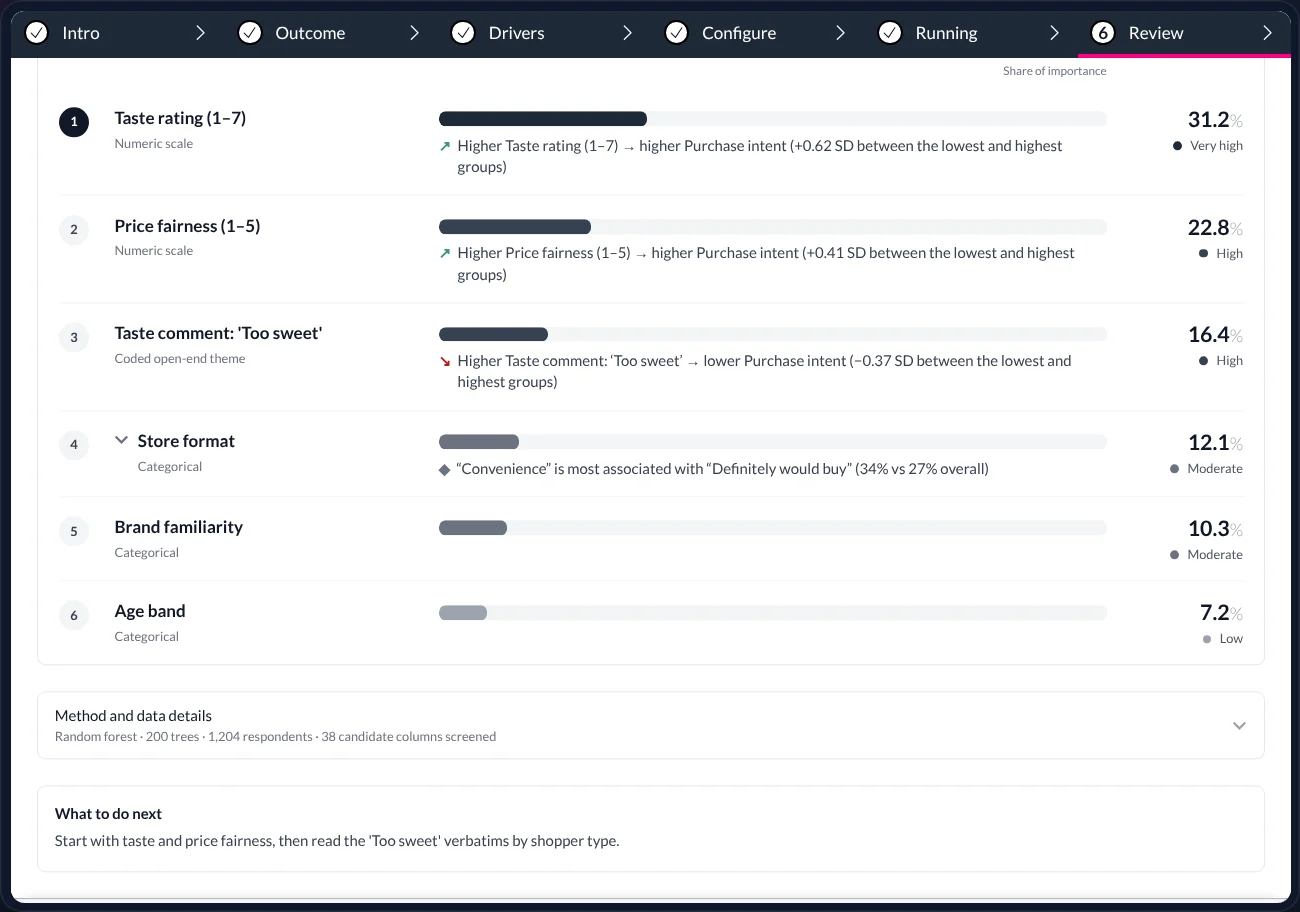
The ranked list, scrolled down so the method disclosure and the “What to do next” note are visible.
- Headline and summary
- At the top (above this crop): the outcome being explained — “Key drivers associated with Purchase intent” — the top driver’s share, the model used, and how many drivers were ranked. Also the line “Rankings show relative influence — not proof of causation”. That caveat is printed on every result.
- Rank and driver
- Each row is one candidate question, numbered by rank. Under the name is its column type — Numeric scale, Categorical, Coded open-end theme — so you can see what kind of answer is being ranked.
- The bar — share of importance
- Bar length and the percentage on the right are the driver’s share of the model’s total importance. All the drivers add up to 100%. Taste rating at 31.2% accounts for just under a third of what the model uses to predict intent.
- The direction sentence
- The arrow and sentence under each bar say which way the relationship runs, in words: “Higher Taste rating → higher Purchase intent (+0.62 SD between the lowest and highest groups)”. ↗ means higher answer, higher outcome; ↘ means the opposite. The figure in brackets is the size of the gap in standard deviations.
- Signal level
- The label at the far right — Very high, High, Moderate, Low — is a plain-language banding of the share, so the eye can group the list without reading every percentage.
- Categorical drivers expand
- For a multiple-choice question such as Store format, the sentence names the option most associated with the outcome (“Convenience” is most associated with “Definitely would buy”, 34% vs 27% overall). Click the chevron to see every option.
- Method and data details
- The grey line at the bottom states exactly what was run: Random forest · 200 trees · 1,204 respondents · 38 candidate columns screened. It is the first thing a sceptical reader asks, so it is already there.
- What to do next
- AddMaple ends with a suggestion written from the result — here, start with taste and price fairness, then read the ‘Too sweet’ comments by shopper type. A prompt, not an instruction.
05 · What it told us
Three priorities to investigate — ranked by their relationship with purchase intent.
- 31.2%
- Taste rating (1–7)
- 22.8%
- Price fairness (1–5)
- 16.4%
- Taste comment: ‘Too sweet’
Higher taste rating → higher purchase intent (+0.62 SD between the lowest and highest groups). The strongest relationship in the study.
Higher price fairness → higher purchase intent (+0.41 SD). Second.
Saying ‘too sweet’ → lower purchase intent (−0.37 SD). A theme coded from the free-text comments, ranked next to the rating scales.
Read the list as the order to investigate things in, not as a verdict. Taste and price fairness are where the relationship with intent is strongest. ‘Too sweet’ is the surprise: a complaint people typed in a text box explains more of the model than store format, brand familiarity or age — and, as the coded table showed, it is concentrated outside the health-led shoppers.
Store format (12.1%), brand familiarity (10.3%) and age band (7.2%) complete the picture. They are in the model; they simply matter less.
06 · How we keep it honest
Rules the result follows, so you don’t have to remember them.
Direction in words
“Higher Taste rating → higher Purchase intent.” No one has to decode a coefficient or guess a sign.Size in context
The gap is stated in standard deviations between the lowest and highest groups, so a large share of importance on a small effect is visible as such.Method on the result
Model, number of trees, sample and candidates screened are printed under the ranking — not in a methods appendix nobody opens.Connected to the rest of the study
Click a driver and you are in its table. Filter the study — to one audience group, say — and the model can be re-run on that base.
07 · Words used on this page
A short glossary.
- Outcome
- The one result the model explains — here, Likely to buy. Sometimes called the target or dependent variable.
- Driver / candidate
- Any other question offered to the model as a possible explanation. ‘Candidate’ before the run; ‘driver’ once ranked.
- Share of model importance
- How much of the model’s predictive power a driver accounts for, as a percentage. All drivers sum to 100%. A measure of relationship, not cause.
- Random forest
- The default model: many decision trees, each trained on a different slice of the respondents, averaged. It handles mixed question types and does not assume straight-line relationships.
- SD (standard deviation)
- A unit for the size of a gap that works across different scales. +0.62 SD between the lowest and highest groups is a substantial difference; ±0.2 would be small.
- Coded open-end / theme
- A free-text question whose answers have been tagged with themes. Each theme becomes a yes/no column — and so can be a driver.
- Column
- AddMaple’s word for one variable in the data: a question, an option from a multiple-choice question, a derived variable, or a coded theme.
- NET
- A derived answer that groups others — Likely to buy = Definitely + Probably. Build it once; every table, chart and model can use it.
08 · Questions
What researchers ask us about key drivers.
- Which model is it, and can I see what it did?
- A random forest by default, with the number of trees, the sample and the candidate columns disclosed on the result. The ranking is a share of model importance; each driver’s direction and effect size are computed from the fitted model and stated in plain language.
- Can a coded open-end really be a driver?
- Yes. Once the comments are coded into themes, each theme is a column like any other and can be screened, selected and ranked. In the table view every comment sits beside its themes with the matching words highlighted, so the coding can be audited before you trust the ranking.
- Does a high share of importance mean the driver is statistically significant?
- No, and we do not blur them. Importance is how much of the model a driver accounts for. Significance is whether a difference is unlikely to be chance. Table Studio tests significance; Key drivers ranks importance. Use both.
- What about multiple-choice (multi-select) questions?
- The question is tested as one driver, so a single option can never be mistaken for the whole question. The result then names the option most associated with the outcome, and you can expand the row to see every option.
- Do I need to know statistics to use it?
- No. You choose the outcome and confirm the candidates; the method is chosen to suit the data and disclosed on the result. Knowing what ‘relationship, not cause’ means is the one thing we ask of every reader — and the result says it in so many words.
Keep reading — the same study, other questions
Table Studio
Every table, and what they mean
Crosstabs for the whole study, ordered by significance, shaded where it matters, exported as a branded workbook.
Read →Audience groups
Who are you talking to?
Find the groups hiding in the answers, compare competing solutions, and keep the one you can explain.
Read →Ask Maple
Your research agent
An agent that works inside the analysis — explaining, charting, coding, modelling and drafting the story.
Read →
AddMaple Mosaic
Find out what would move your number.
Bring a study with an outcome you care about. We’ll run key drivers on it with you, and show you how the ranking connects to the tables, the open-ends and the story.