


Why AddMaple? · an honest comparison
Why not just ChatGPT, Claude or Cursor?Because the numbers shouldn’t be written. They should be computed.
General assistants are brilliant at writing, reasoning and code — and you can hand one a survey export today. This page is an honest account of what you get when you do, what AddMaple does differently for survey and market research, and how to have both: the assistant you already like, working on AddMaple’s engine through MCP.
Who this page is for
You already use ChatGPT, Claude or Cursor and you are wondering whether a dedicated research tool is worth it. You are right to ask: a general assistant can analyse a spreadsheet, write code and explain results.
The short version: for surveys — scales, categories, multi-selects, open-ends, weights, significance — the difference is where the numbers come from, whether you can inspect them, and whether the method fits the data.
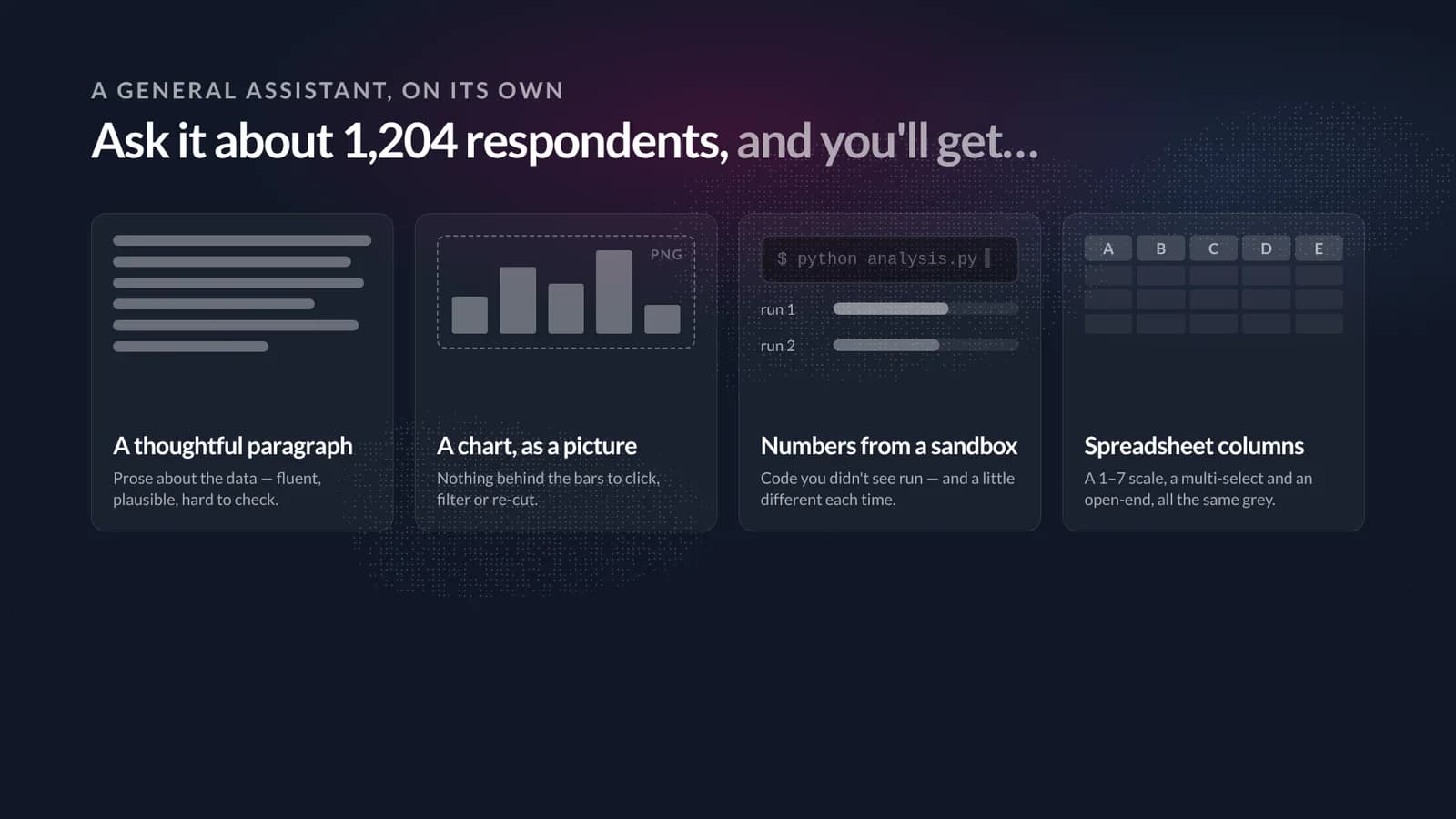
In short — 2 minutes
Or read the full walkthrough — about 16 minutes
- Reliable. In AddMaple the numbers are computed by a research engine, not written by a language model. The same data gives the same answer every time; every difference is tested and the biggest lands first.
- Inspectable. Every number is a thing you can click: behind a cell, the rows; behind a coded theme, the exact words that earned it. You don’t take the evidence on trust — you look at it.
- Built for research. It knows a rating scale from a multi-select from an open-end, routes each to a fitting method and prints the method on the result — including state-of-the-art models for mixed data, with candidates compared on fit.
- Faster, because there is nothing to set up. No describing your columns, no code to debug, no re-running. One sentence, and the answer lands with its table, base and test beside it.
- Best of both. AddMaple’s MCP server gives Claude, Cursor or your own agent the same engine, tools and evidence Maple uses — the reasoning you like, on numbers you can trust.
- 0
- lines of code to describe your columns or run a test
- 1
- engine behind the app, Ask Maple and the MCP server
- 6
- driver models, chosen for the outcome’s type
- 50+
- MCP tools for Claude, Cursor or your own agent
01 · The fair question
What you actually get when you paste a survey into a general assistant
Start from respect. ChatGPT, Claude and Cursor are superb at the parts of research that are language: framing a question, drafting a discussion guide, explaining a result, writing the deck. Given a file, they will also write and run analysis code for you. So what is missing?
The problem
What it does
What you end up with
| What matters | General assistant on its own | AddMaple | AddMaple + your assistant, via MCP |
|---|---|---|---|
| Where the numbers come from | Code the model writes and runs in a sandbox; you read the code to be sure what was computed. | A research engine. Deterministic: same data, same answer, every time. | The same engine — the assistant calls AddMaple’s tools instead of writing its own analysis code. |
| Can you inspect the evidence? | Prose and pictures. To see the rows behind a number you ask again, and hope the sandbox still has the file. | Every cell opens to its rows; every coded theme to the exact words. Tables, bases and tests are on screen. | Tool results carry the same evidence pages; what the assistant tells you is checkable in AddMaple. |
| Survey awareness | Columns are columns. Scales, categories, multi-selects and open-ends need describing in the prompt. | Knows the type of every question on import and routes it to a fitting method, printed on the result. | The tools are survey-shaped: frequencies, crosstabs, profiles, drivers, clusters, text coding. |
| Methods for mixed data | Whatever the model picks from a general statistics library; you check that it suits the data. | Ordinal and multinomial elastic nets, random forests; latent class analysis across scales and categories; candidates compared on fit. | The same models, run and compared by the engine; the assistant reasons about the result. |
| Repeatability | Varies with the prompt, the model and the run. | A table, a driver model or a segmentation is a saved object you can reopen, re-filter and re-export. | The assistant’s actions land as saved objects in the project — visible, reviewable, reversible. |
| Speed to a trustworthy answer | Upload, describe columns, wait for code, debug, re-run, verify — then ask the next question. | Charted and tabulated on import. One sentence in the sentence bar or to Maple; the answer lands with its evidence. | Ask in the assistant you already have open; nothing to set up on the data side. |
| Deliverables | Text and images you paste into a document. | Formatted, branded Excel workbooks; story dashboards readers can filter themselves; charts with their data behind them. | The assistant can draft a story or publish tables through the same tools — you review and publish. |
| Writing, reasoning and judgement | Excellent — this is what these models are for. | Maple drafts and explains inside the analysis; the method and evidence are the engine’s. | Your assistant’s reasoning, on AddMaple’s numbers. This is the point of the MCP server. |
This compares ways of working, not model quality, and is not a speed benchmark. Capabilities vary by tool and plan. Where AddMaple is weaker — general writing, code, data outside surveys — the honest section below says so.
02 · Reliable
Computed, not written.
The most important difference is the least visible one. When AddMaple shows you 26.9%, no language model produced that number. A research engine counted 324 of 1,204 respondents, applied the base and the weights, ran the test and rendered the cell. Ask again tomorrow and the same data gives exactly the same answer.
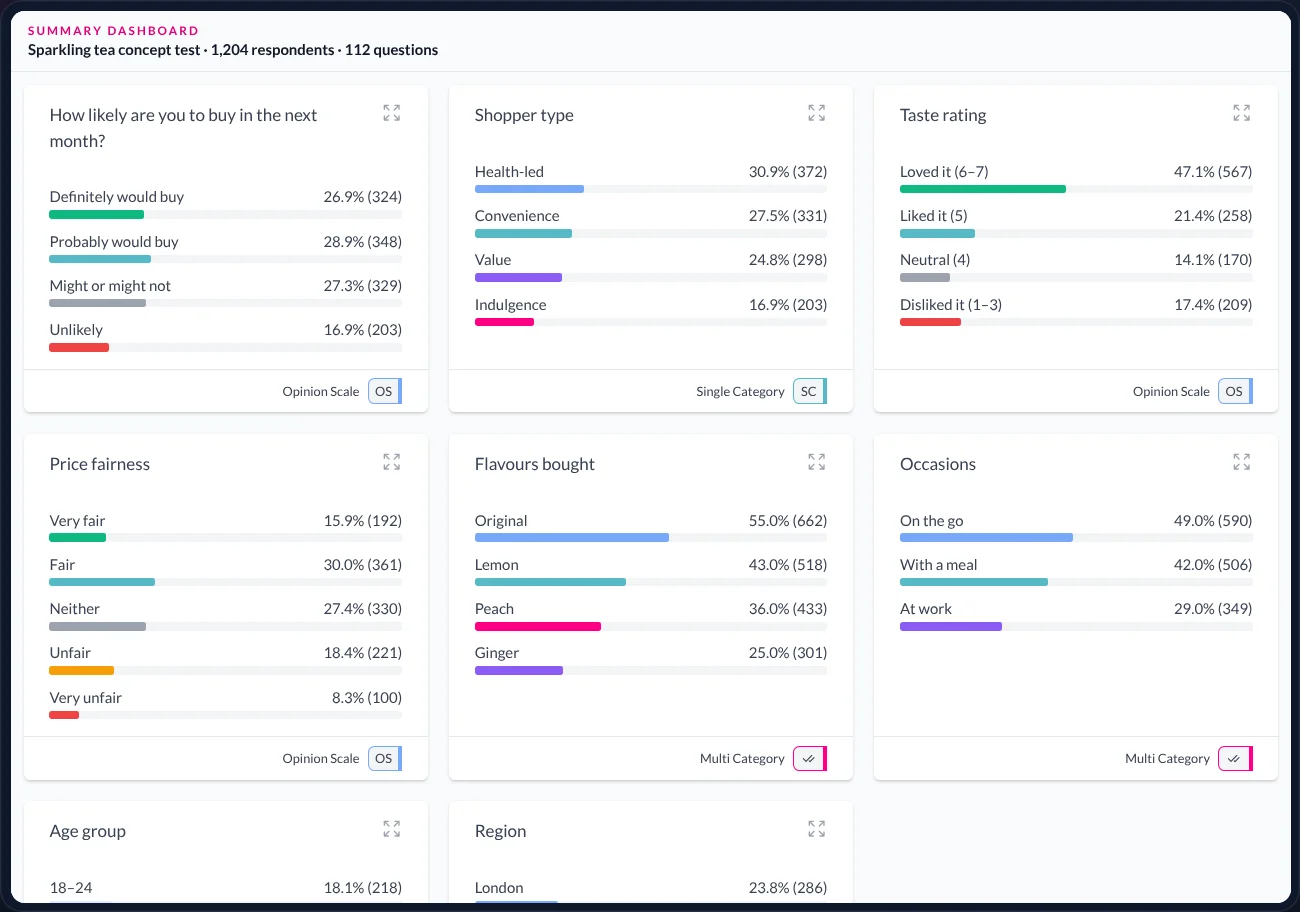
That is what reliable means here. Not that a general assistant gets sums wrong — modern models with a code sandbox are usually right — but that you cannot tell from the answer. The figure arrives in prose, computed by code you did not write, in a session you cannot reopen. Checking it costs as much as doing it.
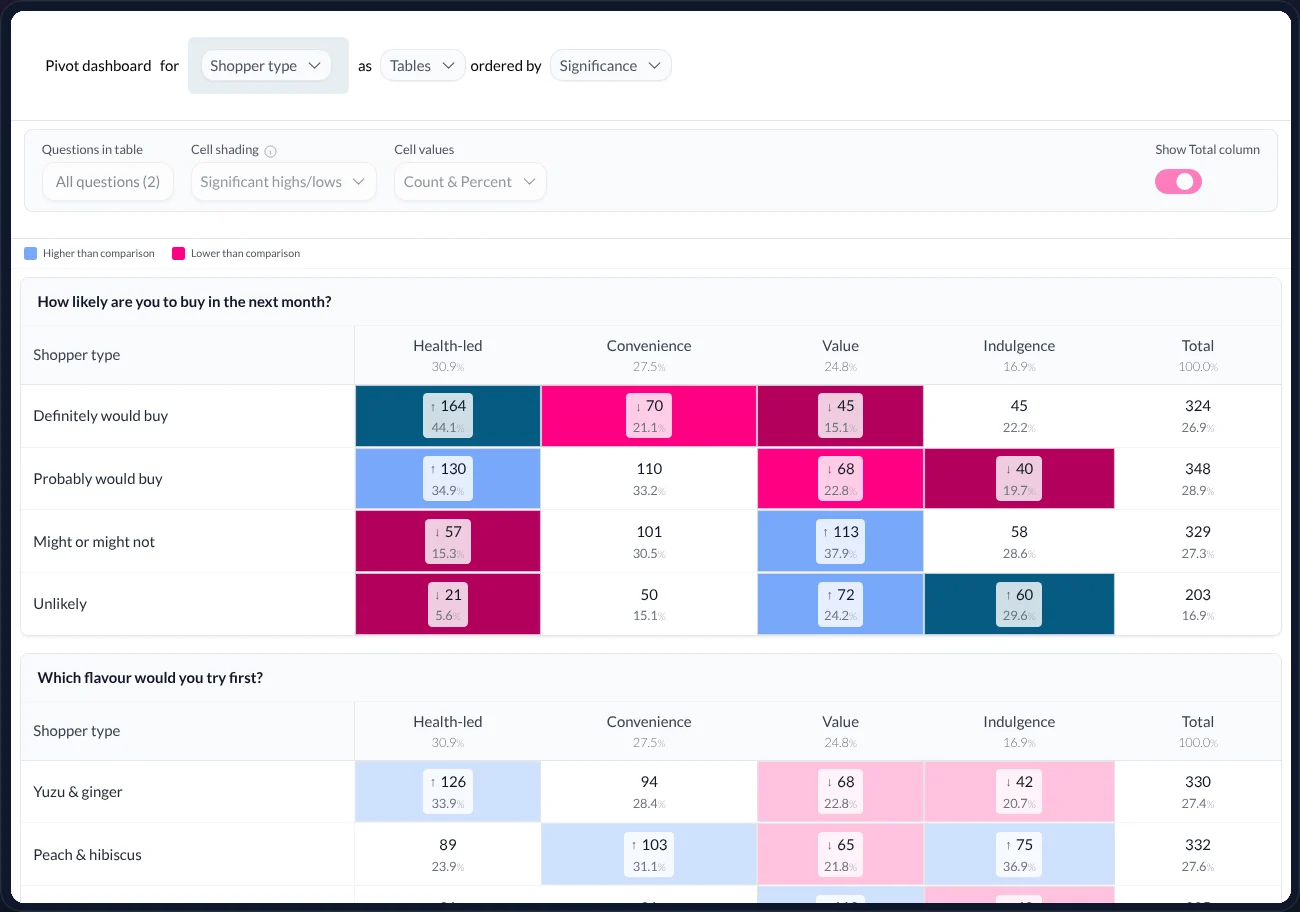
In AddMaple the computation is the product. Every table is built from the same engine with the same conventions for bases, weights and missing data; every difference between groups is tested; and the study is ordered so that the questions where groups differ most come first.
03 · Inspectable
Every number is a thing you can click.
A number you cannot open is a number you have to trust. In AddMaple, behind every cell are the rows that made it, and behind every coded theme are the exact words that earned it — highlighted in the response.
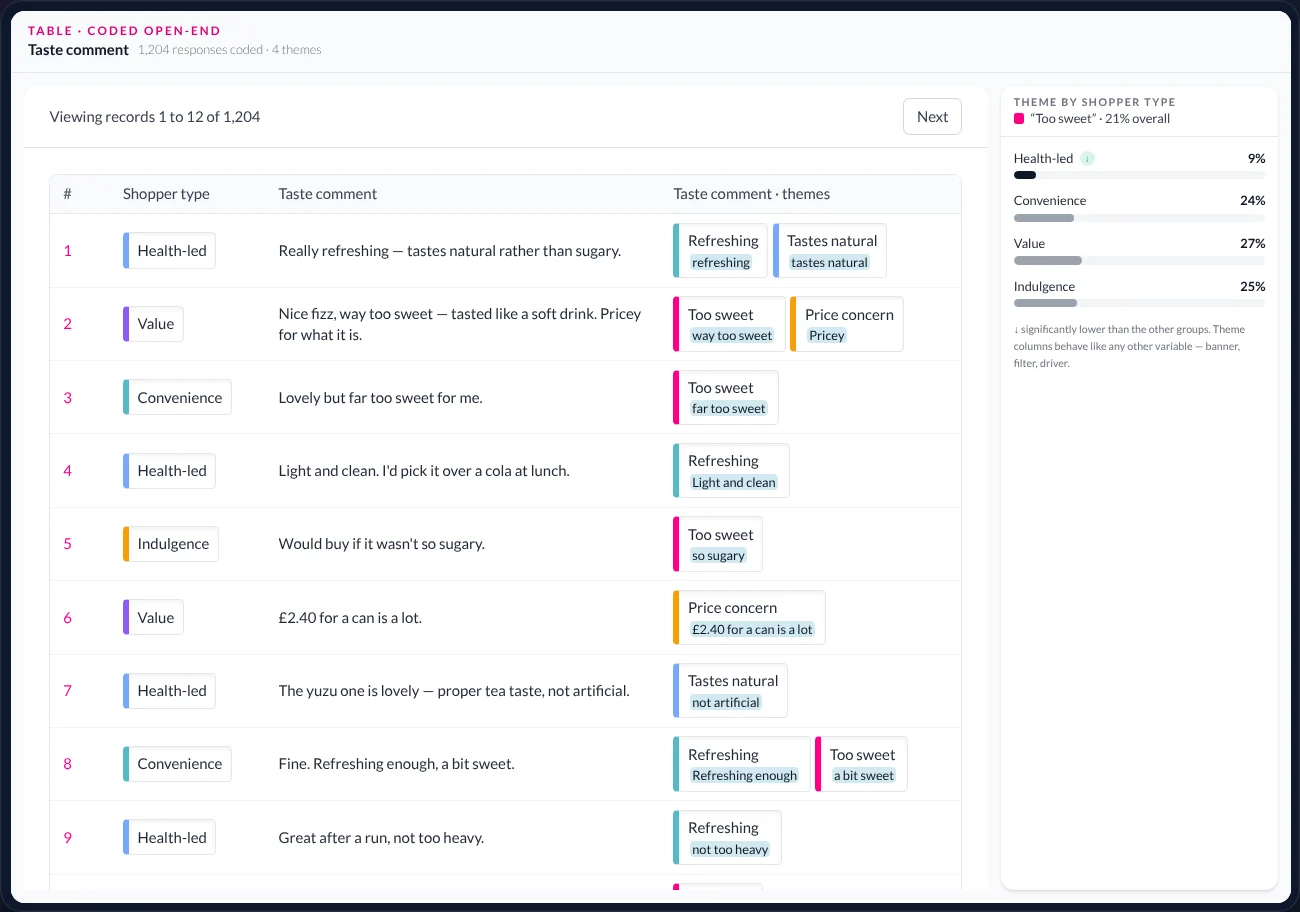
What you are seeing: the table view on the open-ended taste question, with the coded theme column beside the original text.
- The rows
- Each respondent is a row. The table is the data, not a summary of it — filters, banners and drivers all resolve back to rows like these.
- The original words
- The open-ended answer, untouched. AddMaple never rewrites or replaces source text.
- The coded theme
- Themes such as “Too sweet” or “Refreshing”, assigned by the coding step and reviewable by you. A coded theme is a column like any other: it can be a banner, a filter or a candidate driver.
- The evidence
- Under each theme chip, the phrase in the response that earned it. This is what a general assistant’s paragraph cannot give you: the specific words, for every respondent, every time.
- The split
- The rail shows the theme by shopper type. “Too sweet” is 21% overall — and significantly lower among health-led shoppers, marked with a glyph rather than coloured text.
04 · Built for research
It knows a rating scale from a multi-select from an open-end.
AddMaple is tuned to surveys, market research and anything else where people answered questions. That shapes everything: how data is typed on import, which method each question is routed to, and which models exist at all.
- 01
Types, not columns
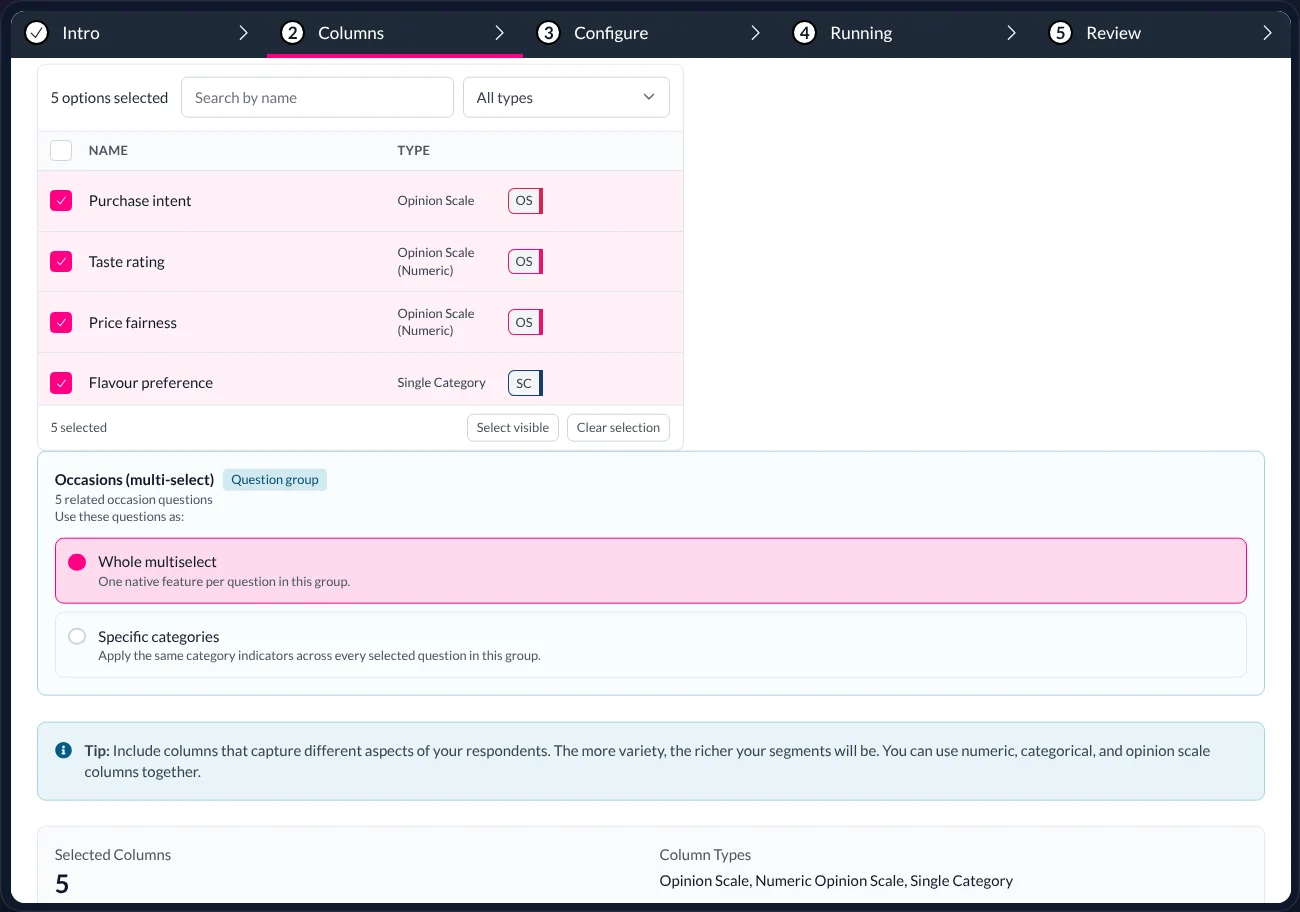
What you are seeing: choosing columns for a segmentation. Beside each name is its type — ordinal scale, numeric rating, category, multi-select grid — as the engine read it on import. The occasions grid is one question with five parts, not five unrelated columns.
A general assistant has to be told this. AddMaple knows it, and every method downstream respects it.
- 02
The right method, printed on the result
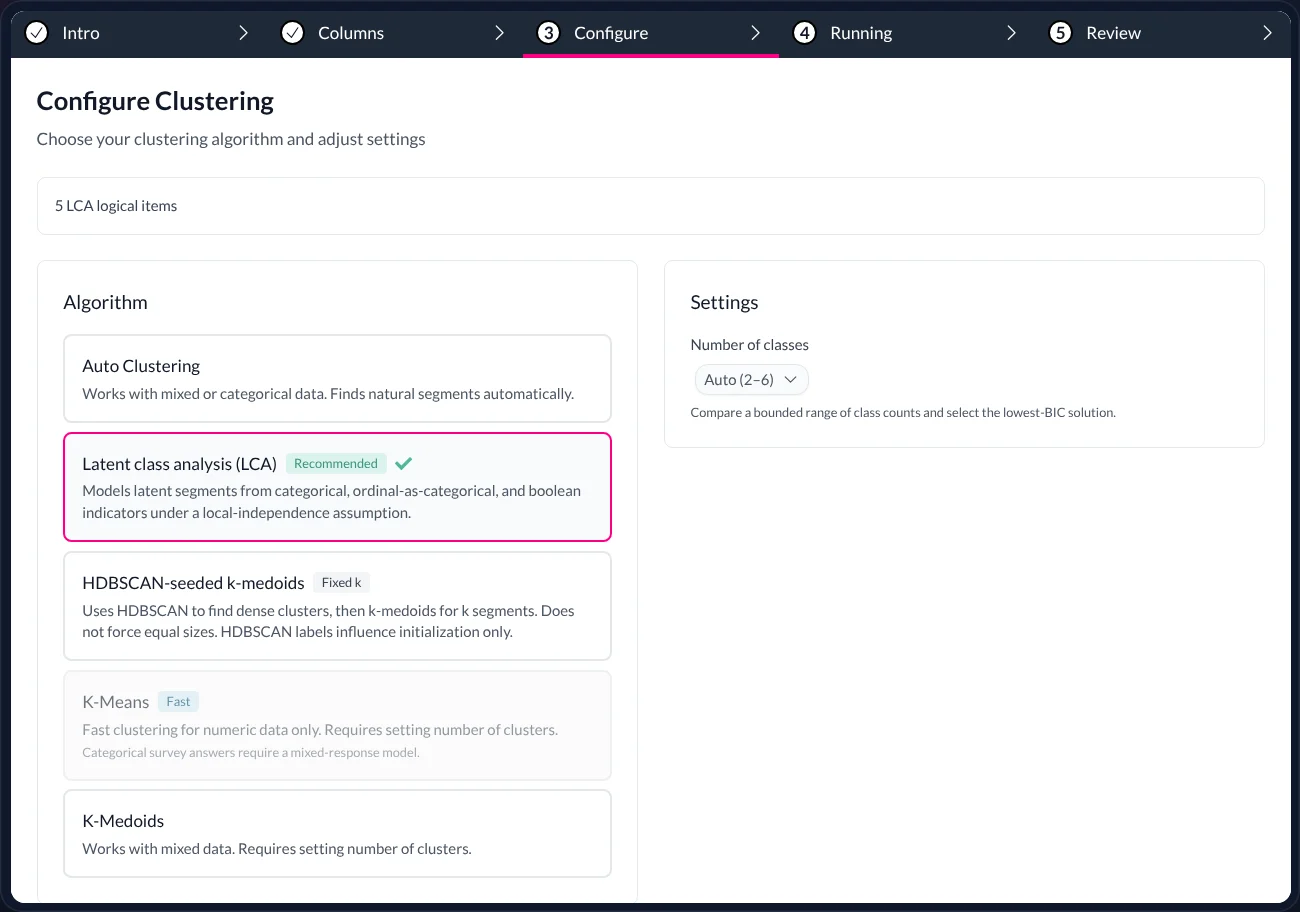
What you are seeing: the method step. For a mix of scales and categories, AddMaple recommends latent class analysis and explains why; k-means, k-medoids and HDBSCAN are there when the data suits them. For key drivers the same routing picks between logistic, ordinal and multinomial elastic nets, a plain elastic net and a random forest, depending on what the outcome is.
Whatever runs, its name and settings sit on the result, so the method can be defended, not just the number.
- 03
Candidates compared on fit — for you to evaluate
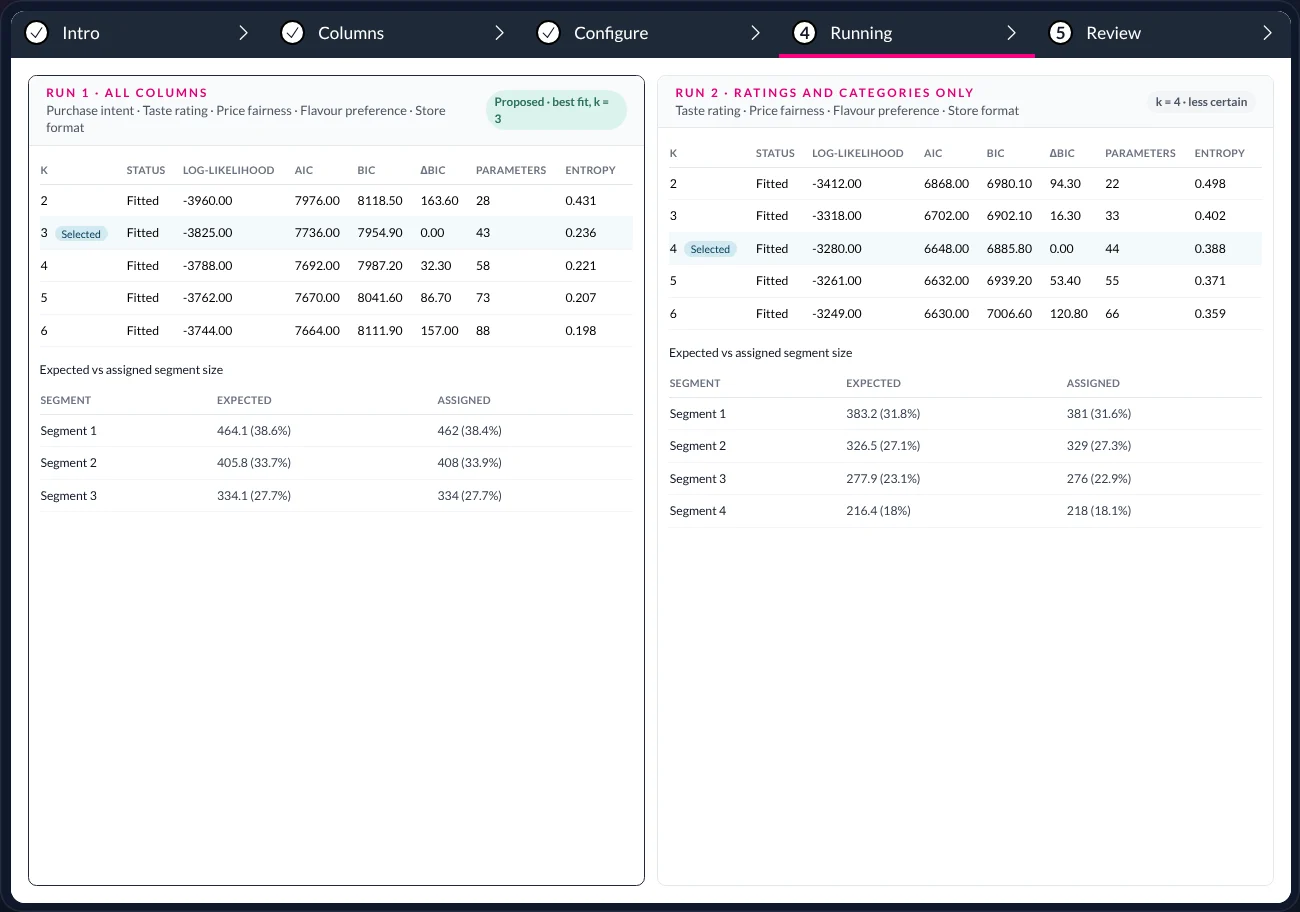
What you are seeing: two segmentation runs side by side with their candidate solutions and diagnostics. Run 1 on all columns proposes k = 3 as the best fit by BIC; a second run on ratings and categories only lands on four groups, less cleanly.
The engine proposes the best-fitting candidate. The researcher evaluates it. That division of labour is a design rule, not a limitation.
Crosstabs and significance
Banner tables for the whole study, tested between columns and ordered by where groups differ most. See Table Studio.Key drivers
Which questions relate most to an outcome — across scales, categories, multi-selects and coded themes together, with direction and share of model importance. See Key drivers.Audience groups
Latent class analysis and other clustering methods across mixed data; multiple runs compared on fit; the chosen solution saved as a column. See Audience groups.Open-end coding
Themes proposed, applied to every response with the evidence phrase recorded, and reviewable before they become columns.Cleaning that respects the questionnaire
Ordered scales recognised, grids grouped into one question, labels from the data map — proposed as a reviewable batch, never applied silently. See Clean data.Deliverables researchers actually send
Formatted, branded Excel workbooks and story dashboards that readers can filter for themselves.
05 · Faster
Not a quicker model. Nothing to set up.
AddMaple is faster to a trustworthy answer for a plain reason: the work a general assistant has to do before it can compute anything — understanding your columns, writing code, running it, fixing it — has already been done, once, by the engine.
Chat assistant with a code sandbox
- Upload the file
- Describe every column and scale
- Wait for the analysis code
- Debug it when a column surprises it
- Run it again
- Read the code to verify the number
- Start over for the next question
AddMaple
- Import: every question typed, charted and tabulated
- Ask in one sentence — the sentence bar, or Maple
- The answer lands with its table, base and test
- Click into the evidence
- Ask the next question of the same, live study
06 · Best of both
Keep your assistant. Give it AddMaple’s engine.
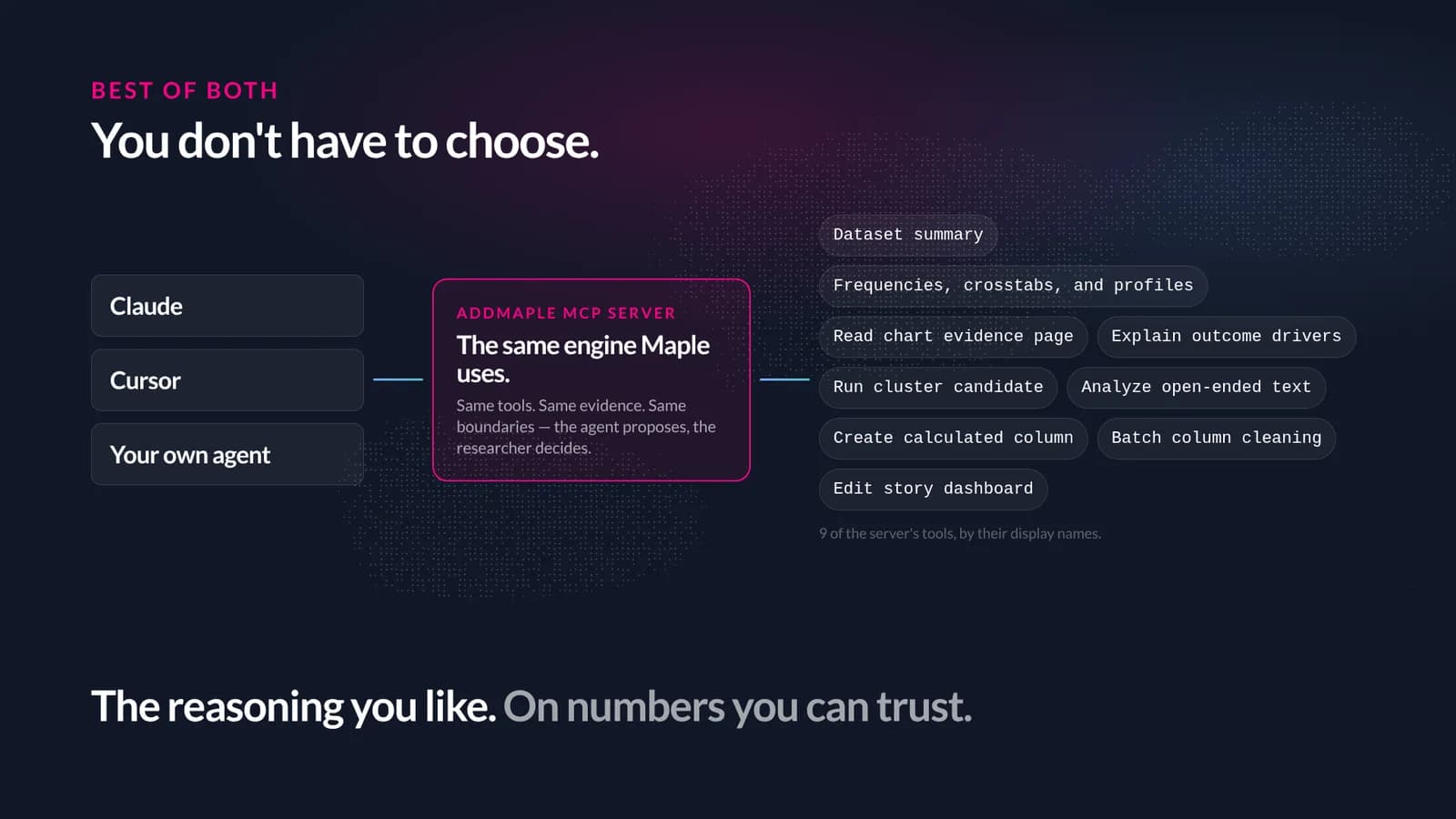
You do not have to choose. AddMaple’s MCP server exposes the same tools Maple uses — the same engine, the same evidence, the same boundaries — to Claude, Cursor or an agent you build yourself.
The problem
What it does
What you end up with
- MCP
- Model Context Protocol — an open standard through which assistants such as Claude and Cursor call tools exposed by other software.
- AddMaple MCP server
- AddMaple’s implementation: more than fifty tools over HTTP, authenticated with an API key or an OAuth connection, scoped to the projects you grant.
- Tool
- One capability with a typed input and output — “Frequencies, crosstabs, and profiles”, “Explain outcome drivers”, “Run cluster candidate”, “Analyze open-ended text”…
- Read-only vs. mutating
- Every tool is annotated. Reading data and running analyses is read-only; creating columns, cleaning or editing a dashboard is a change, visible in the project and reversible.
07 · The honest part
When a general assistant is the better tool
Comparison pages that never concede anything are not worth reading. Here is where to use what.
Use the general assistant when…
The work is language: discussion guides, questionnaire drafts, summarising a report, writing the deck. Or the data is not a survey — logs, finance, code. Or you need a one-off calculation and no one will ask you to show the rows.Use AddMaple when…
People answered questions and you need the numbers to be right, inspectable and repeatable: tabulation, significance, drivers, segments, coded open-ends, weighted bases, and deliverables a client can interrogate.Use both when…
You want your assistant’s reasoning and writing on AddMaple’s evidence. Connect it over MCP and let it call the engine instead of writing its own statistics.What AddMaple will not do
Pretend to be a general assistant. It will not write your code or your proposal, and Maple stays inside the analysis. It also will not colour a result to make it look more certain than its test says it is.
08 · Questions
Questions people ask
- Isn’t Ask Maple just a chatbot too?
- Maple is a language model, and it writes the explanations and proposals. But it does not compute the numbers: it calls the same engine tools the app and the MCP server use, and every action it takes shows up as a saved, reversible object in the project. See Ask Maple.
- Could I get the same result by prompting carefully?
- Often, for one analysis, with care. The difference is the second analysis, the tenth, and the moment someone asks you to show the rows. AddMaple makes correct the default and inspectable the norm, rather than something you re-earn every prompt.
- What does “deterministic” buy me?
- The same table from the same data, every time, for everyone on the team — which is what a client, an auditor or a colleague re-running your work needs. A language model writing code is not deterministic in that sense, even when it is right.
- Which assistants work with the MCP server?
- Any client that speaks MCP over HTTP, including Claude and Cursor, and agents you build yourself. Authentication is by API key or an OAuth connection, scoped to the projects you grant.
- Does the engine use AI at all?
- Where it helps: proposing cleaning batches, coding open-ends into themes, drafting stories, and in Maple’s explanations. Counting, testing, modelling and rendering are the engine’s, and every AI proposal is reviewable before it becomes part of the study.
- Is this a benchmark?
- No. It is a comparison of ways of working on survey data. Capabilities of general assistants vary by product and plan and change quickly; the structural points — where numbers come from, whether evidence is inspectable, whether methods fit survey types — do not.
Keep reading — the same study, other questions
Ask Maple
Your research agent
An agent that works inside the analysis — explaining, charting, coding, modelling and drafting the story.
Read →Table Studio
Every table, and what they mean
Crosstabs for the whole study, ordered by significance, shaded where it matters, exported as a branded workbook.
Read →The whole study
All of Mosaic in one study
What AddMaple is, and how one study moves through it — from a messy export to a published story.
Read →
AddMaple Mosaic
Bring your assistant. Bring your research.
See AddMaple on your own study — and connect the assistant you already use through MCP so its answers come from the same engine.